# What is Sanko?

Sanko is an [Arbitrum Orbit Layer 3](https://docs.arbitrum.io/launch-orbit-chain/orbit-gentle-introduction) designed to bring the internet of value to the golden days of gaming. Sanko’s subcent transaction fees, 250ms transaction finality, and superior developer tooling make it the ideal infrastructure layer to enable gamers to participate and seamlessly transact in in-game economies — the natural evolution of a passion shared by millions. As it matures, Sanko will evolve into a console on which diverse projects host games that can interoperate in ways not possible in traditional video game publishing platforms.

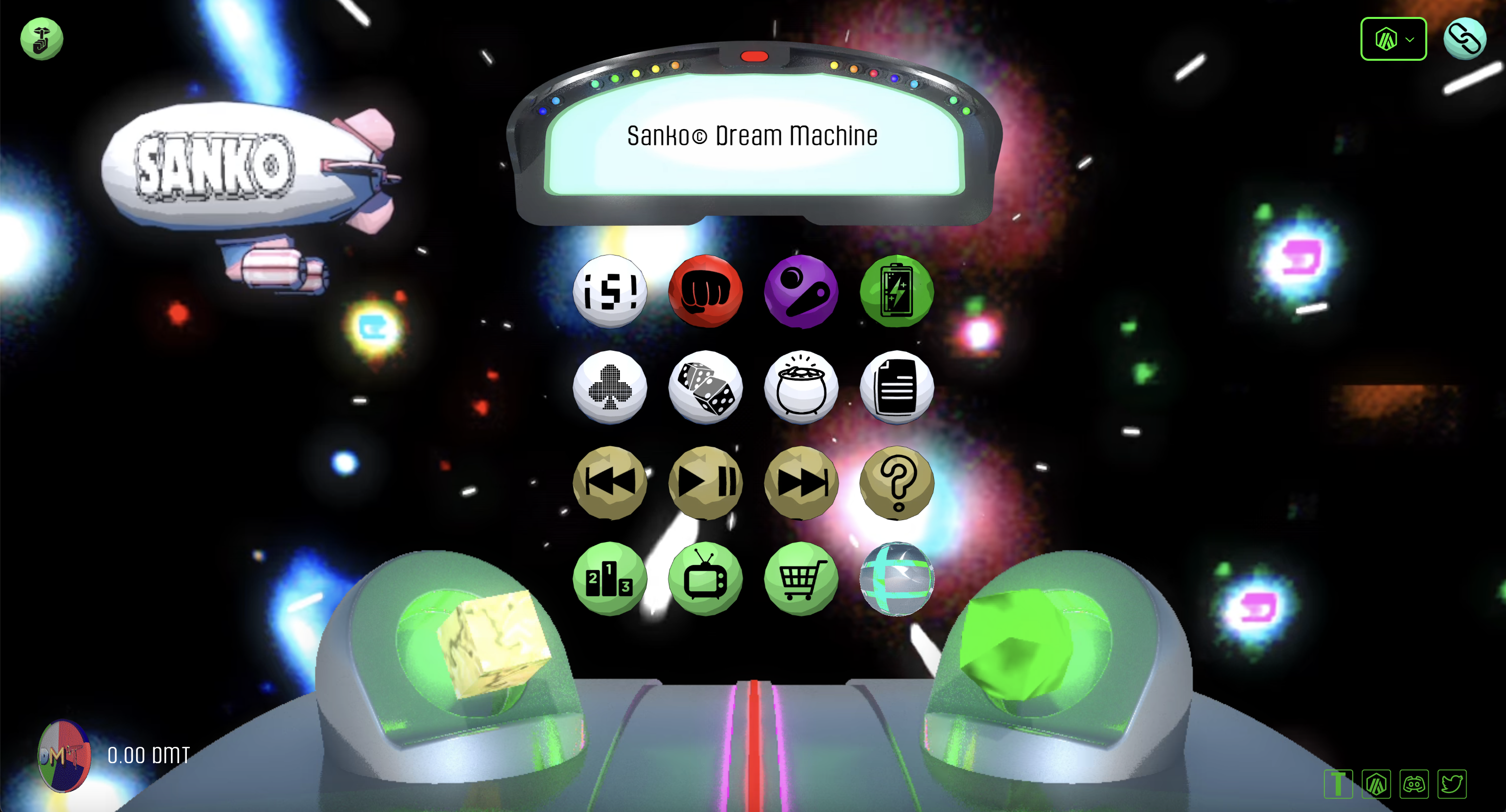
Sanko was created by Sanko GameCorp©, the on-chain game studio behind The Dream Machine and Sanko.TV. In addition to titles deployed by Sanko GameCorp, independent game developers will be incentivized to deploy their titles to Sanko.


# Sanko Overview

As a custom implementation of [Arbitrum AnyTrust](https://docs.arbitrum.io/inside-anytrust) that settles to Arbitrum, Sanko features a 10-100x decrease in transaction cost and increase in TPS compared to standard optimistic rollups. Sanko’s fundamental improvement over existing rollups lies within improved computation and memory, significantly more efficient data availability, and enhanced developer tooling via Stylus.

Sanko features two computation engines: an EVM and a virtual machine that executes WebAssembly (WASM), a modern binary format used in major browsers and web standards to speed up computation. This design decision has three major effects on its functionality:

1. It allows for Geth’s EVM implementation to be used directly, enabling Sanko to maintain full EVM equivalence and low transaction fees simultaneously.
2. Any programming language that can compile down to WASM, including Rust, C, and C++, will eventually be able to be used to write smart contracts on Sanko. Smart contracts written in different programming languages will also be composable, allowing, for example, Rust developers to call programs or rely on dependencies written in Solidity or vice versa.
3. Faster execution and reduced transaction fees due to WASM’s significantly greater efficiency compared to EVM. WASM’s increased efficiency also makes memory over 100x less costly, making consuming RAM viable for dApps.


# AnyTrust and the Data Availability Committee

<figure><img src="https://content.gitbook.com/content/uH6OpygnhtT4R1DM7JI2/blobs/PK0wilNdHZNmO2TAfya2/image.png" alt=""><figcaption><p>Sanko's initial Data Availability Cohort</p></figcaption></figure>

Sanko achieves subcent transaction fees in part by significantly reducing the costs associated with posting transaction data – the largest cost component for most optimistic rollups.

Sanko adopts a minimal trust assumption in the form of the Data Availability Committee – a cohort of validators responsible for storing transaction data and providing it on demand. Rather than posting full data blocks, Committee members post Data Availability Certificates (DACerts) containing the hash of a data block, an expiration time, and proof that a sufficient number of Committee members have signed the pair attesting to the validity of the block.&#x20;

Sanko assumes that at least two Committee members are honest; thus, if the Committee has N members and N – 1 promise to provide access to transaction data, at least one of the promisers will provide data as needed to ensure the proper functioning of the chain.

<br>


# Keysets

Keysets specify the public keys of Committee members and the number of signatures required for a Data Availability Certificate to be valid. Keysets make Committee membership changes possible and provide Committee members the ability to change their keys.

Keysets are identified by their hashes, and each contains:

* the number of Committee members.
* a BLS public key for each Committee member.
* the number of Committee signatures required.

An L2 KeysetManager contract maintains a list of currently valid Keysets. The L3 chain's Owner can add or remove Keysets from this list. When a Keyset becomes valid, the KeysetManager contract emits an L2 event containing the Keyset's hash and full contents. This allows the contents to be recovered later by anyone, given only the Keyset hash.

Although the API does not limit the number of Keysets that can be valid at the same time, normally only one Keyset will be valid.


# Data Availability Certificates​

Data Availability Certificates (DACerts) allow the Sanko Sequencer to circumvent the costs associated with posting transaction data to the settlement layer, resulting in significantly more effective cost-effective transaction processing compared to other rollups.

&#x20;A DACert contains:

* the hash of a data block
* an expiration time
* proof that N-1 Committee members have signed the (hash, expiration time) pair, consisting of
  1. the hash of the Keyset used in signing
  2. a bitmap saying which Committee members signed
  3. a BLS aggregated signature (over the BLS12-381 curve) proving that those parties signed.

Because of the 2-of-N trust assumption, a DACert constitutes proof that the block's data (i.e., the preimage of the hash in the DACert) will be available from at least one honest Committee member, at least until the expiration time.

<br>


# Data Posting Mechanisms

Sanko gives the sequencer two ways to post a data block to the settlement layer: it can post the full data block, or it can post a DACert proving the availability of the data. Arbitrum will reject any DACert that uses an invalid Keyset; the other aspects of DACert validity are checked by L3 code.

The L3 code that reads data from the inbox reads a full-data block as in ordinary Nitro. If it sees a DACert instead, it checks the validity of the DACert, with reference to the Keyset specified by the DACert (which is known to be valid because the base chain Inbox verified that). The L3 code verifies that

* the number of signers is at least the number required by the Keyset, and
* the aggregated signature is valid for the claimed signers, and
* the expiration time is at least two weeks after the current L3 timestamp.

If the DACert is invalid, Sanko discards the DACert and moves on to the next data block. If the DACert is valid, Sanko reads the data block, which is guaranteed to be available because the DACert is valid.<br>


# Data Availability Servers​

Sanko Data Availability Committee members run Data Availability Server (DAS) software. The DAS exposes two key APIs: the REST API, and the Sequencer API.

* The REST API is a RESTful HTTP(S) based protocol that allows data blocks to be fetched by hash. This API is fully cacheable, and deployments may use a caching proxy or CDN to increase scale and protect against DoS attacks.
* The Sequencer API is a JSON-RPC interface allowing the Sequencer to submit data blocks to the DAS for storage. Deployments will typically block access to this API from callers other than the Sequencer.


# Sequencer-Committee Interaction

To use the Committee to post a batch of transaction data, the Sanko sequencer sends the batch and an expiration time via RPC to all Committee members simultaneously. Each Committee member stores the data in its backing store, indexed by the data's hash. Then the member signs the (hash, expiration time) pair using its BLS key, and returns the signature with a success indicator to the sequencer.

Upon collecting the necessary number of signatures, the sequencer aggregates them and creates a valid DACert for the (hash, expiration time) pair. The Sequencer then posts that DACert to Arbitrum, making it available to the Sanko software at L3.

If the Sequencer fails to collect enough signatures within a few minutes, it will abandon the attempt to use the Committee, and will "fall back to rollup" by posting the full data directly to Arbitrum. Sanko can understand both data posting formats (via DACert or via full data) and will handle each one correctly.

<br>


# Official Links

Below is a list of Sanko applications and relevant links to all things Sanko.

**SANKO**\
Sanko Mainnet Homepage: <https://sanko.xyz/>\
SankoPets: <https://sanko.pet/>\
SankoTV: <https://sanko.tv/>\
Sanko Dream Machine: <https://www.sankodreammachine.net/>

**BRIDGES**\
Sanko Mainnet Bridge: <https://bridge.sanko.xyz/>\
$DMT Arbitrum to Ethereum Mainnet Bridge: <https://stargate.finance/transfer>

**EXPLORERS AND ANALYTICS**\
SankoTools (Block Explorer and Screener): <https://tools.sanko.xyz/>\
Sanko Mainnet Blockscout Explorer: <https://explorer.sanko.xyz/>\
Sanko Mainnet Docs: <https://docs.sanko.xyz/>\
Sanko Mainnet Defined.fi Screener: <https://www.defined.fi/sanko/>\
$DMT Ethereum Dexscreener: <https://dexscreener.com/ethereum/0xe3170d65018882a336743a9c396c52ea4b9c5563>\
$DMT Arbitrum Dexscreener: <https://dexscreener.com/arbitrum/0x410c879c62f22794bd5ee98e2ee01490f6d47a6b>\
$DMT Contract: <https://arbiscan.io/address/0x8B0E6f19Ee57089F7649A455D89D7bC6314D04e8> \
$DMT Mainnet Contract: <https://etherscan.io/address/0x0b7f0e51cd1739d6c96982d55ad8fa634dd43a9c>

**TRADING**\
Camelot Sanko Mainnet: <https://app.camelot.exchange/>\
Sudoswap Sanko Mainnet (NFT): <https://sudoswap.xyz/>\
Uniswap ETH Mainnet LP: <https://app.uniswap.org/#/swap?outputCurrency=0x0b7f0e51cd1739d6c96982d55ad8fa634dd43a9c&chain=ethereum>\
SankoSwap: <https://swap.sanko.xyz/> \
Camelot DEX: <https://app.camelot.exchange/?token2=0x8b0e6f19ee57089f7649a455d89d7bc6314d04e8>\
Camelot LP Contract: <https://arbiscan.io/address/0x410c879c62f22794bD5eE98e2EE01490F6d47A6b>&#x20;

**SOCIALS**\
Official Twitter: <https://twitter.com/SankoGameCorp>\
Official SankoTV Twitter: <https://twitter.com/SankoDotTV>

**SANKO NFTS**\
Sanko Pets Buns: <https://sudoswap.xyz/#/browse/sanko/buy/buns>\
Sakura Park: <https://pro.opensea.io/collection/sakura-park>\
Streets Of Milady: <https://pro.opensea.io/collection/streetsofmilady>\
Sakura Park Sudoswap V2: <https://sudoswap.xyz/#/browse/buy/0x82235445a7f634279E33702cc004B0FDb002fDa7>\
Streets Of Milady Sudoswap V2: <https://sudoswap.xyz/#/browse/buy/0x94fe1d5de3a4208c7411ae21968e044abc17be48>

**MISC**\
Official Arbitrum One Rewards Vesting Page: <https://sankodreammachine.net/vestingSanko>\
TV FAQs: <https://sankotv.notion.site/SankoTV-FAQ-d0238a9aa8ea48bcad353e99f24df785>


# Connect to Sanko Mainnet

## Chain Details:

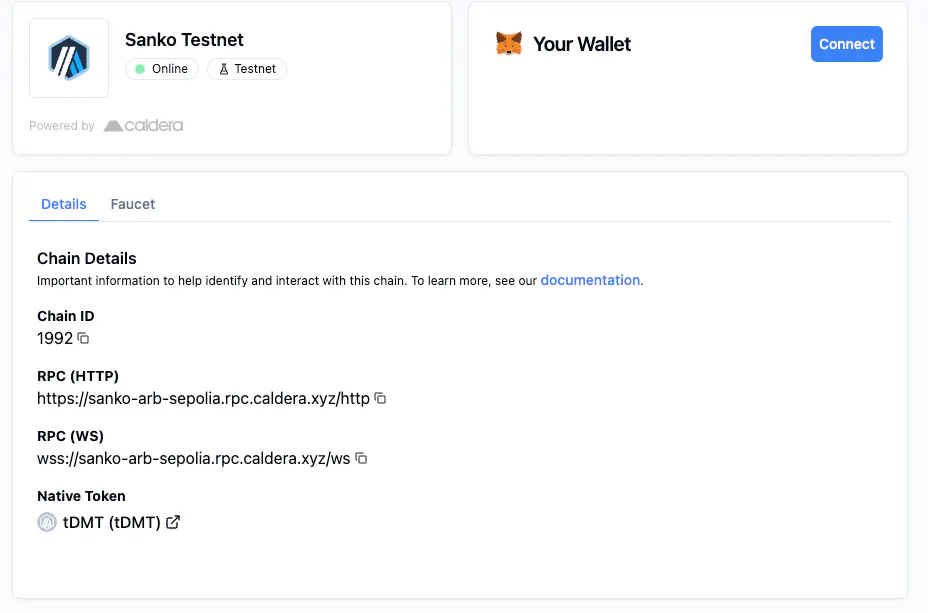
* Network Name: Sanko
* RPC URL: <https://mainnet.sanko.xyz>
* Chain ID: 1996
* Currency Symbol: DMT
* Block Explorer URL: <https://explorer.sanko.xyz/>
* SankoTools: <https://tools.sanko.xyz/>

You can connect to Sanko using any wallet that supports EVM blockchains.


# Bridge to Sanko

Sanko Mainnet is connected to Arbitrum One via the native bridge. Our Anytrust data availability layer allows user Anytrust data availability layer allows user withdrawals from Sanko to bypass the usual 7 day wait time.

We also partnered with LayerZero to allow bridging of our Ethereum DMT OFT between Arbitrum and Sanko in less than 3 minutes, and is integrated natively into our site. In order to bridge from Solana to Sanko, use the Stargate bridge.\
\
Links:

Sanko Bridge (native + LayerZero): [bridge.sanko.xyz](https://sanko.xyz/bridge)

Sanko <> Solana bridge: [stargate.finance](https://stargate.finance/bridge?srcChain=solana\&srcToken=236dqm1gdXTqfw2DGwHVWoTgPAr4QKdWeNMr9fpxFXzr\&dstChain=sanko\&dstToken=0x754cDAd6f5821077d6915004Be2cE05f93d176f8)

Relay bridge (any chain <> Sanko): [relay.link](https://relay.link/bridge/sanko?toCurrency=0x0000000000000000000000000000000000000000)


# Native DEXs

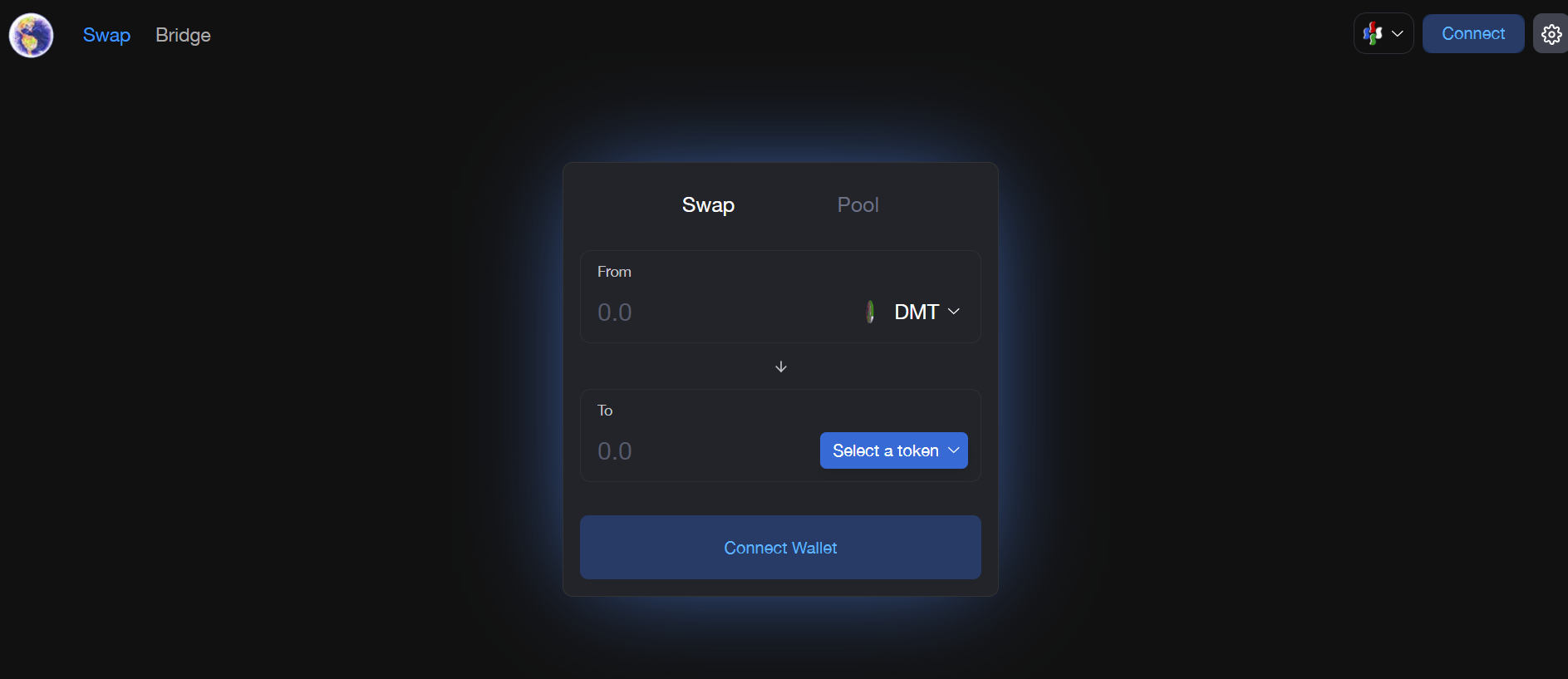
Sanko Mainnet features two native DEXs — Sankoswap and Camelot Exchange. Details about both platforms can be found in the following subsections.


# Sankoswap

## What is Sankoswap?

Sankoswap is an automated liquidity protocol and custom implementation of Uniswap v2 powered by the constant product formula (x \* y = k). Each Sankoswap pair manages a liquidity pool made up of reserves of two ERC-20 tokens.

Pairs on Sankoswap are automated market makers that accept one token in the pair (x) for the other (y) so long as the constant product formula is preserved. Under the constant product formula, trades must not change the product (k) of a pair's reserve balances (x and y).

Anyone can provide liquidity for a pool on Sankoswap by depositing an equivalent value of each underlying token in return for pool tokens, which track pro-rata LP shares of the total reserves. LP tokens can be redeemed for the underlying assets at the LP token-holder's discretion.

<figure><img src="https://1941999756-files.gitbook.io/~/files/v0/b/gitbook-x-prod.appspot.com/o/spaces%2FuH6OpygnhtT4R1DM7JI2%2Fuploads%2Fv3gqsbTeKu0VBEOQW6a1%2Fimage.png?alt=media&amp;token=d7e54721-1fd1-4b62-9f67-6a62141412ac" alt=""><figcaption></figcaption></figure>


# Camelot Exchange

<figure><img src="https://1941999756-files.gitbook.io/~/files/v0/b/gitbook-x-prod.appspot.com/o/spaces%2FuH6OpygnhtT4R1DM7JI2%2Fuploads%2FyyxSzoXsDwIWvYs9ETtR%2Fimage.png?alt=media&amp;token=4c462478-df93-4094-875a-cd3ac18ae8ed" alt="" width="375"><figcaption></figcaption></figure>

## What is Camelot?

Camelot is a DEX and Launchpad originally built on Arbitrum One. Camelot's V2 and V3 automated market makers (AMMs) are live on Sanko.

For additional information on Camelot, refer to the [Camelot docs](https://docs.camelot.exchange/).&#x20;


# Camelot V2

Camelot's V2 AMM features dual-liquidity types, meaning that it's able to support both volatile and stable pairs.

Volatile pairs are composed of uncorrelated assets, based on the Uniswap V2 model using the constant product formula (x\*y=k). Stable pairs are used for correlated assets and try to maintain a 1:1 transfer ratio, using a formula based on the Solidly curve (x³y + y³x = k).

Camelot V2 also features dynamic directional fees for trading pairs, allowing different fees to be set for each pool. Camelot pairs can be configured with their own swap fees, and can be set up with different values depending on the swap direction.


# Camelot V3

Camelot's V3 AMM is based on Algebra's v1.9 codebase and operates similarly to Uniswap V3 with a range of custom features that enhance efficiency and performance.


# Concentrated Liquidity

Camelot V3 allows liquidity providers to concentrate their capital within specific price ranges, leading to increased liquidity at preferred prices. Users can choose to employ both manual mode and auto mode, with the latter automating the adjustment of price ranges.

To provide liquidity to V3 Sanko, navigate to the Trade tab, select Liquidity and choose V3

<figure><img src="https://1941999756-files.gitbook.io/~/files/v0/b/gitbook-x-prod.appspot.com/o/spaces%2FuH6OpygnhtT4R1DM7JI2%2Fuploads%2FcRjOuPsEJWZ7PwqOTwkc%2Fimage.png?alt=media&amp;token=944d2da1-1bae-45a2-9fa1-a89a073c5d3d" alt=""><figcaption></figcaption></figure>

Next, the pair you want to provide liquidity to.

<figure><img src="https://1941999756-files.gitbook.io/~/files/v0/b/gitbook-x-prod.appspot.com/o/spaces%2FuH6OpygnhtT4R1DM7JI2%2Fuploads%2Fok74LZ0j4KsW5fVwSGPF%2Fimage.png?alt=media&amp;token=aa84a99b-a5c0-4f9b-a272-a8eb36ede245" alt=""><figcaption></figcaption></figure>

Then select either manual or auto mode.&#x20;

<figure><img src="https://1941999756-files.gitbook.io/~/files/v0/b/gitbook-x-prod.appspot.com/o/spaces%2FuH6OpygnhtT4R1DM7JI2%2Fuploads%2F0ZsbVvBnyeJUlcl9tH4P%2Fimage.png?alt=media&amp;token=6990d4bb-1235-4f37-ae34-b16d9c406842" alt=""><figcaption></figcaption></figure>

Manual mode is tailored for experienced liquidity providers, granting them control over the price ranges of the liquidity they provide. Auto mode employs focused liquidity management strategies, handling the intricate task of adjusting price ranges for users.


# Customizable Tickspacing

Camelot V3 allows users to customize tick spacing settings for each liquidity pool. This feature unlocks unparalleled flexibility by allowing tailored tick parameters. By providing the flexibility to adjust tick spacing, V3 AMM ensures optimal efficiency for each liquidity pool.


# Directional & Dynamic Volatility Fees

V3 introduces a fee structure that adapts to the underlying market volatility. The protocol dynamically adjusts the fees for each liquidity pool based on prevailing volatility, enhancing fee generation and trade volume.

One of the notable aspects of this feature is the ability to set distinct volatility-based fee ranges for both buy and sell directions. As a result, each liquidity pool can offer highly tailored fee structures that cater to specific market conditions. This customization leads to increased fees and trading volume as fees more accurately reflect the market's risk profile.

During periods of low trading volume, the fees automatically adjust downwards. Conversely, when the market experiences heightened volatility, the fees proportionally increase.


# Sudoswap

## **What is Sudoswap?**

Sudoswap is a gas-efficient NFT automated market maker (AMM) protocol that has been forked onto Sanko Mainnet. Sudoswap facilitates NFT-to-token swaps (and vice versa) using customizable bonding curves. Sudoswap supports ERC721 and ERC1155 NFTs, as well as all ETH and ERC20 tokens.

Liquidity providers (LPs) can deposit assets into single-sided buy or sell pools, or into dual-sided trade pools which buy *and* sell NFTs with an optional spread to capture trading fees.

Similar to other floor NFT protocols, sudoswap makes no distinction between different ERC721 IDs. Pools that are willing to buy or sell NFTs will return the same price no matter which NFT is sent in or out from the collection.

For further information on sudoswap, refer to the [sudoswap docs](https://docs.sudoswap.xyz/).


# Sudoswap Overview

## How Does Sudoswap Work?

Similarly to Uniswap, sudoswap users buy from or sell into liquidity pools instead of directly trading between themselves.

Here is an overview of how it works:

1. Liquidity providers deposit NFTs and/or ETH (or an ERC20 token) into liquidity pools. They choose whether they would like to buy or sell NFTs (or both) and specify a starting price and bonding curve parameters.
2. Users can then buy NFTs from or sell NFTs into these pools. Every time an item is bought or sold, the price to buy or sell another item changes for the pool based on its bonding curve.
3. At any time, liquidity providers can change the parameters of their pool or withdraw assets.

## **What Is A Liquidity Pool?**

A liquidity pool is a smart contract that allows you to instantly swap between two assets. On sudoswap, the most common type of pool is an NFT<>ETH pool, which means that anyone holding NFTs from that collection can instantly swap them for ETH, or vice versa.

Pools use a bonding curve to determine the relative price at which one asset is traded for another. The more an asset is bought from the pool, the more expensive it becomes. Conversely, the more an asset is sold to the pool, the cheaper it becomes.

## Sudoswap v2 Major Features

sudoAMM v2 introduces four new major features for users and creators:

* Royalty support for ERC2981-compliant collections, plus fallback royalty solutions.
* LP agreements called Settings whereby creators can opt-in to waive royalties for eligible pools.
* On-chain property filtering powered by Merkle trees, tokenId ranges, or custom smart contract logic.
* ERC1155 support.


# Bonding Curves

A bonding curve is a mathematical formula that defines the relationship between an asset's price and its supply. Bonding curves are used to algorithmically adjust asset prices in AMMs.

sudoswap supports three types of bonding curves: linear, exponential, and constant product (x \* y = k).

## **Linear Bonding Curves**

With a linear bonding curve, the price of an NFT is increased by a flat amount (called delta) every time an item is bought from the pool. Conversely, the price of the NFT is decreased by that same flat amount every time an item is sold to the pool.

For example, a liquidity provider may create an NFT<>ETH pool with a Start Price of 1 ETH and a delta of 0.1 ETH. Assuming they provide enough liquidity, the price of an NFT will increase to 1.1 ETH after one item is purchased from the pool. After a second item is purchased, the price will increase to 1.2 ETH, and so on. At any point, if an NFT is sold to the pool, the price will decrease by 0.1 ETH.

## **Exponential Bonding Curves**

With an exponential bonding curve, the price of an NFT is increased by a certain percentage (also called delta) every time an item is bought from the pool. Conversely, the price of the NFT is decreased equivalently every time an item is sold to the pool.

To calculate the equivalent decrease, convert the percentage to a decimal index (e.g. for 50%, the index would be 1.5) and divide the price by this number.

For example, a liquidity provider may create an NFT<>ETH pool with a Start Price of 2 ETH and a delta of 50%. Assuming they provide enough liquidity, the price of an NFT will increase to 2 + 50% = 3 ETH after one item is purchased from the pool. After a second item is purchased, the price will increase to 3 + 50% = 4.5 ETH, and so on. At any point, if an NFT is sold to the pool, the price will be divided by 1.5.

## Constant Product Bonding Curves (x \* y = k)

With a constant product bonding curve, the price of an NFT is adjusted every time an item is bought from or sold to the pool, such that the product (k) of two virtual reserves (x and y) remains constant after every trade. These virtual reserves correspond to the number and value of NFTs the pool will buy or sell.

An additional concentration parameter allows liquidity providers to tighten or lossen constant product bonding curves.

## GDA Curve

The GDA curve is an implementation of the [discrete gradual Dutch auction](https://www.paradigm.xyz/2022/04/gda#discrete-gda), where `spotPrice` is the price of the currently "auctioned" NFT irrespective of time decay, and `delta` stores the auction parameters `alpha` and `lamba`, as well as the timestamp of the last trade `prevTime`.

In contrast to the specification linked above, the GDA curve calculates the price of each item as a function of the last. The net price exclusive of fees for a user to buy *x* NFTs is `inputValue_ = (spotPrice * (alpha^x - 1)) / ((alpha - 1) * 2^(lambda * timeElapsed))` where `timeElapsed` is the time elapsed since the last NFT was sold.

Conversely, the net price for a user to sell *x* NFTs is `outputValue_ = (spotPrice * 2^(lambda * timeElapsed) * (alpha^x - 1)) / (alpha^(x - 1) * (alpha - 1))` where `timeElapsed` is the time elapsed since the last NFT was sold.

Immediately after every trade, the pair state is updated:

* Pair sells: `spotPrice = (spotPrice * alpha^x) / 2^(lambda * timeElapsed)`
* Pair buys: `spotPrice = (spotPrice * 2^(lambda * timeElapsed)) / alpha^x`

In both cases, `delta` is also updated to reflect the current `block.timestamp`.

**Parsing `delta`**

The GDA curve stores three values in `delta`. They are the auction parameters `alpha` and `lamba`, as well as the timestamp of the last trade `prevTime`.

Since `delta` is of type `uint128`, this is achieved as follows:

* The highest 40 bits represent `alpha` with 9 decimals of precision.
* The middle 40 bits represent `lambda` with 9 decimals of precision.
* The lowest 48 bits represent the timestamp of the last trade `prevTime`.

For a given auction, `alpha` and `lambda` are constants, while `prevTime` (and thus `delta` as a whole) must be updated immediately after every trade.


# Royalties

Royalties are enforced on liquidity pools at the contract level. Royalties are automatically enabled for collections implementing the [ERC2981 royalty standard](https://eips.ethereum.org/EIPS/eip-2981).

## Royalty Engine

The `RoyaltyEngine` contract is a fork of the [Royalty Engine](https://github.com/manifoldxyz/royalty-registry-solidity/blob/main/contracts/RoyaltyEngineV1.sol) created by Manifold as part of the Royalty Registry initiative. This contract determines the provisional value of royalties due for a swap of given `value` and the address that should receive them. If a collection implements ERC2981, the `RoyaltyEngine` retrieves royalty information from the collection contract itself.

Royalty information returned from the engine is used in the `_calculateRoyalties` function on pair contracts, which is called internally by all swap methods, unless:

* The royalty exceeds the sale price, in which case no royalty is applied.
* A Setting is in place for the pool.

When a Setting is in place for a given pair, the `_calculateRoyalties` function will overwrite the royalty *value* returned by the `RoyaltyEngine` using the `getFeeSplitBps` view on the Setting contract.


# Settings

Settings are opt-in contracts that allow creators to waive (partially or entirely) royalties for liquidity pools that meet their chosen criteria, such as a 90-day lockup period or 50:50 trading fee split.

Creators can develop Settings using the logic of their choosing, but the resulting contract should conform to the `ISettings.sol` interface:

```
interface ISettings {
    struct PairInfo {
        address prevOwner;
        uint96 unlockTime;
        address prevFeeRecipient;
    }

    function getFeeSplitBps() external pure returns (uint64);

    function getRoyaltyInfo(address pairAddress) external view returns (bool, uint96);

    function settingsFeeRecipient() external returns (address payable);

    function getPrevFeeRecipientForPair(address pairAddress) external returns (address);
}

```

Once a Setting has been deployed, the creator of the relevant NFT collection should call `toggleSettingsForCollection` on the Pair Factory to ratify the Setting, thus waiving royalties for pools enrolled in that Settings.

To enroll in a Setting, liquidity providers transfer ownership of their pool to the Setting contract using the `transferOwnership` method on the pool contract. Creators should design Settings such that only pools which meet the desired criteria can be transferred to the Setting contract.

## Standard Settings

A Standard Setting has three criteria:

* `ethCost`, an upfront fee to the liquidity provider in gwei.
* `secDuration`, a lockup period in seconds.
* `feeSplitBps`, a trading fee split in basis points.

Any liquidity provider who accepts these criteria can participate in the Setting. Following the lockup period, the liquidity provider can call `reclaimPair` on the Setting contract to withdraw their pool from the Setting.

Creators can deploy Standard Settings without writing any code by using the `createSettings` method on the `StandardSettingsFactory`. In addition to the criteria above, this method takes two parameters:

* `settingsFeeRecipient`, the address which will receive the creator's trading fee split.
* `royaltyBps`, the waived royalty rate in basis points.

## Fee Splitter <a href="#fee-splitter" id="fee-splitter"></a>

When ownership of a liquidity pool is transferred to a Standard Settings contract, a fee splitter (`Splitter.sol`) is deployed to handle the distribution of trading fees between the liqudity provider and creator.

Any address or contract can call the withdrawal methods on the Splitter, such as `withdrawETH`, to atomically withdraw all accrued fees and split them between the liqudity provider and creator per the `feeSplitBps`.

Additionally, Setting owners can call `bulkWithdrawFees` on a Setting to trigger fee withdrawal from all Fee Splitters deployed under that Setting.


# Property Checking

## Properties

sudoAMM v2 enables users to create property-specific liquidity pools. Properties are enforced at the `LSSVMPair` level on buy methods, meaning that only NFTs with the specified properties can be sold into pools.

Property checking logic is contained within dedicated contracts called Property Checkers. Users can develop Property Checkers using the logic of their choosing, but the resulting contracts should conform to the `IPropertyChecker.sol` interface expected by pair contracts:

```
interface IPropertyChecker {
    function hasProperties(uint256[] calldata ids, bytes calldata params) external returns(bool);
}
```

The interface's single method `hasProperties` takes an array of tokenIds and optional bytes calldata, returning true or false if the specified tokenIds meet the Property Checker's criteria. The optional bytes calldata can be used to pass additional information to the Property Checker, such as proof-of-inclusion in a Merkle tree.

In order to leverage property checking, liquidity providers must specify a Property Checker when creating pools with the Pair Factory. The Property Checker that is specified for a pool at creation cannot be changed or removed.

## Default Property Checkers

sudoAMM v2 provides two default Property Checkers which can be cloned by users with custom parameters. For instructions on doing so, visit sudoswap's [documentation](https://docs.sudoswap.xyz/reference/property-checkers/) on cloning Property Checkers.

### RangePropertyChecker <a href="#rangepropertychecker" id="rangepropertychecker"></a>

`RangePropertyChecker` checks whether tokenIds passed to the `hasProperties` method lie within a `lowerBound` and `upperBound` specified when the contract was cloned.

For this Property Checker, the optional bytes calldata is not used.

### MerklePropertyChecker <a href="#merklepropertychecker" id="merklepropertychecker"></a>

`MerklePropertyChecker` checks whether tokenIds passed to the `hasProperties` method are leaves in an arbitrary Merkle tree whose root was specified when the contract was cloned.

For this Property Checker, the optional bytes calldata is used by the client to pass a Merkle proof.


# ERC1155 NFTs

sudoAMM v2 supports ERC1155 NFT pairs against both ETH and ERC20 tokens. The design of ERC1155 pairs is similar to that of ERC721 pairs, with the key difference being that ERC1155 pairs must specify a single NFT ID that can be traded by the pair.

The NFT ID permitted to trade must be provided when the pair is created, after which it cannot be changed.

### Factory and Router Support <a href="#factory-and-router-support" id="factory-and-router-support"></a>

ERC1155 pairs are created with dedicated methods on the `LSSVMPairFactory`: `createPairERC1155ETH` and `createPairERC1155ERC20`.

There are no dedicated methods for ERC1155 pairs on the routers as they are fully compatible with the generic methods.


# User Guide

You can instantly trade NFTs on sudoswap by buying from and selling into existing NFT liquidity pools.

## Buying NFTs

1. Go to the [Collections](https://sudoswap.xyz/#/) page and select a collection.
2. Select the NFTs you want to buy to add them to the cart:

<figure><img src="https://1941999756-files.gitbook.io/~/files/v0/b/gitbook-x-prod.appspot.com/o/spaces%2FuH6OpygnhtT4R1DM7JI2%2Fuploads%2Fn7N4v19KalXtlRJeyuEU%2Fimage.png?alt=media&amp;token=61798ce2-2be1-4107-b8f1-fb79d6e8d4bd" alt=""><figcaption></figcaption></figure>

3. Click "> sudo swap" to initiate the swap.
4. Confirm the transaction in your wallet.

## Selling NFTs

1. Go to the Collections page and select a collection.
2. Open the Sell tab at the top of the page:

<figure><img src="https://1941999756-files.gitbook.io/~/files/v0/b/gitbook-x-prod.appspot.com/o/spaces%2FuH6OpygnhtT4R1DM7JI2%2Fuploads%2FvMICIJbMMjTmP8p3U2lQ%2Fimage.png?alt=media&amp;token=5ca5ebb7-20b6-4ea5-80ac-9d42da91100a" alt=""><figcaption></figcaption></figure>

3. Select the NFTs you want to sell and click "> sudo swap".
4. Give sudoswap access to the NFTs by confirming the first transaction in your wallet.
5. Finalize the sale by confirming the second transaction in your wallet.


# Creating a Liquidity Pool

Anyone can provide liquidity on sudoswap. You can choose whether you want to buy or sell NFTs across a range of prices, or do both to earn trading fees.

To create a pool, navigate to the [Create Pool](https://sudoswap.xyz/#/create) interface. Follow the steps below depending on the type of pool you want to create.

<figure><img src="https://1941999756-files.gitbook.io/~/files/v0/b/gitbook-x-prod.appspot.com/o/spaces%2FuH6OpygnhtT4R1DM7JI2%2Fuploads%2FNdiMhRE4T6UwNZyvcXPI%2Fimage.png?alt=media&amp;token=32b2111f-bdee-4119-8590-aa67fc0c9a6e" alt=""><figcaption></figcaption></figure>

### Trade Pool (Buy and Sell) <a href="#trade-pool-buy-and-sell" id="trade-pool-buy-and-sell"></a>

1. On the [Create Pool](https://sudoswap.xyz/#/create) interface, select an NFT collection in the top-left pane.
2. Optionally, choose an ERC20 token the NFTs should trade against.

<figure><img src="https://1941999756-files.gitbook.io/~/files/v0/b/gitbook-x-prod.appspot.com/o/spaces%2FuH6OpygnhtT4R1DM7JI2%2Fuploads%2Fu6bA017c47vntDUl0GTh%2Fimage.png?alt=media&amp;token=d1ad2957-3ab6-42bf-9107-5915bfd00354" alt=""><figcaption></figcaption></figure>

3. Under the *Deposits* section, choose how much ETH/ERC20 token to deposit (based on how many NFTs you are willing to buy) and which of your NFTs to deposit to seed the pool:

<figure><img src="https://1941999756-files.gitbook.io/~/files/v0/b/gitbook-x-prod.appspot.com/o/spaces%2FuH6OpygnhtT4R1DM7JI2%2Fuploads%2F8Aw9pytuto1XlpGvgnOU%2Fimage.png?alt=media&amp;token=626cc657-8ac4-4411-a559-b62651e66091" alt=""><figcaption></figcaption></figure>

4. Under the *Strategy* section, choose a starting Sell price for the pool. The corresponding Buy price is automatically adjusted in the following steps.
5. Adjust the percentage Fee which will be taken on every trade.
6. Select a type of price curve from the dropdown box and adjust the curve parameter as desired.

<figure><img src="https://1941999756-files.gitbook.io/~/files/v0/b/gitbook-x-prod.appspot.com/o/spaces%2FuH6OpygnhtT4R1DM7JI2%2Fuploads%2Fwpbq3lpk8TeAvoANEaWZ%2Fimage.png?alt=media&amp;token=164cf3b5-dc91-416d-894a-520030f549fa" alt=""><figcaption></figcaption></figure>

7. Click "Create Pool" and confirm the approval and pool creation transactions in your wallet.

## Buy-Only Pool

1. On the [Create Pool](https://sudoswap.xyz/#/create) interface, select the Buy pool type in the top right-pane:

<figure><img src="https://1941999756-files.gitbook.io/~/files/v0/b/gitbook-x-prod.appspot.com/o/spaces%2FuH6OpygnhtT4R1DM7JI2%2Fuploads%2FN3X5hV2w5AIvjE1LnccT%2Fimage.png?alt=media&amp;token=e06273f5-f7ab-474d-b6a5-16fb056e04e0" alt=""><figcaption></figcaption></figure>

2. Follow the same steps you would to create a Trade pool, as documented above. Notice that:
   * Under the *Deposits* section, you only choose how much ETH/ERC20 token to deposit (based on how many NFTs you are willing to buy) to seed the pool.
   * Under the *Strategy* section, the starting price you choose is a Buy price.

## Sell-Only Pool

1. On the [Create Pool](https://sudoswap.xyz/#/create) interface, select the Sell pool type in the top right-pane:

<figure><img src="https://1941999756-files.gitbook.io/~/files/v0/b/gitbook-x-prod.appspot.com/o/spaces%2FuH6OpygnhtT4R1DM7JI2%2Fuploads%2FV2UdHUuIreQOA5KFbciJ%2Fimage.png?alt=media&amp;token=3cf55a58-2543-4677-b8e4-10f7fd459532" alt=""><figcaption></figcaption></figure>

2. Follow the same steps you would to create a Trade pool, as documented above. Notice that:
   * Under the *Deposits* section, you only choose which of your NFTs to deposit to seed the pool.
   * Under the *Strategy* section, the starting price you choose is a Sell price.


# Managing Existing Pools

To edit a pool, click on your address at the top-right of any page, click on [My Pools](https://sudoswap.xyz/#/pool), and select the pool.

<figure><img src="https://1941999756-files.gitbook.io/~/files/v0/b/gitbook-x-prod.appspot.com/o/spaces%2FuH6OpygnhtT4R1DM7JI2%2Fuploads%2FoJNsbWcqECgzQFueb4Fk%2Fimage.png?alt=media&amp;token=96f826ec-5f59-4aae-b97d-fb19488babb1" alt=""><figcaption></figcaption></figure>

### Updating Pricing <a href="#updating-pricing" id="updating-pricing"></a>

1. Navigate to the [My Pools](https://sudoswap.xyz/#/pool) page.
2. Click on the pool you want to change.
3. Click on the "Edit Pool" button at the top-right of the page.
4. Enter a new start price, delta, and or swap fee (only for Trade pools) for the pool:

<figure><img src="https://1941999756-files.gitbook.io/~/files/v0/b/gitbook-x-prod.appspot.com/o/spaces%2FuH6OpygnhtT4R1DM7JI2%2Fuploads%2Fh24O756ifsoYIoKjBMPo%2Fimage.png?alt=media&amp;token=2105765e-42aa-48b1-becd-9570e718a985" alt=""><figcaption></figcaption></figure>

5. Click "Update" and confirm the transaction in your wallet.

*Note: It is not possible to change a pool's type (linear, exponential, etc). Instead, withdraw your assets from the existing pool and create a new one.*

### Depositing and Withdrawing

1. Navigate to the [My Pools](https://sudoswap.xyz/#/pool) page.
2. Click on the pool you want to deposit to or withdraw from.
3. Click on the Deposit or Withdraw button in the Tokens or NFTs pane.

   * For tokens, simply enter an amount and click the Deposit or Withdraw button:

   <figure><img src="https://1941999756-files.gitbook.io/~/files/v0/b/gitbook-x-prod.appspot.com/o/spaces%2FuH6OpygnhtT4R1DM7JI2%2Fuploads%2FnDl2hYCVHZNAnWBaknyt%2Fimage.png?alt=media&amp;token=bbd143f8-4943-4c4f-9939-802c5b41783a" alt=""><figcaption></figcaption></figure>

   For NFTs, select the NFTs you wish to deposit or withdraw and click the Deposit or Withdraw button:

<figure><img src="https://1941999756-files.gitbook.io/~/files/v0/b/gitbook-x-prod.appspot.com/o/spaces%2FuH6OpygnhtT4R1DM7JI2%2Fuploads%2FcK1ff2J7YkABgzlEs6T7%2Fimage.png?alt=media&amp;token=07691b5f-5530-409e-959b-18a2457847d6" alt=""><figcaption></figcaption></figure>


# Creating an Auction

Auctions are liquidity pools that use the gradual Dutch auction (GDA). Anyone can create an auction to buy or sell NFTs on sudoswap.

To create an auction, navigate to the [Create Auction](https://sudoswap.xyz/#/auction/create) interface. Then, follow the steps below.

1. On the [Create Auction](https://sudoswap.xyz/#/auction/create) interface, select an NFT collection in the top pane:

<figure><img src="https://1941999756-files.gitbook.io/~/files/v0/b/gitbook-x-prod.appspot.com/o/spaces%2FuH6OpygnhtT4R1DM7JI2%2Fuploads%2FoZLcttUz3hVfIZ1TjS6c%2Fimage.png?alt=media&amp;token=d69e2a79-6ba3-4ec0-aac2-2c355f368a4d" alt=""><figcaption></figcaption></figure>

2. Choose whether you want to buy or sell NFTs.
3. Optionally, choose an ERC20 token the NFTs should trade against. By default, NFTs trade against ETH.
4. Enter a starting price for the auction and select the auction speed:

<figure><img src="https://1941999756-files.gitbook.io/~/files/v0/b/gitbook-x-prod.appspot.com/o/spaces%2FuH6OpygnhtT4R1DM7JI2%2Fuploads%2FeuItDTjptuyRKcZRWrys%2Fimage.png?alt=media&amp;token=1f6cc2b9-c597-4196-9118-d892edb71604" alt=""><figcaption></figcaption></figure>

5. Enter the total amount you wish to spend or select the NFTs you'd like to auction:

<figure><img src="https://1941999756-files.gitbook.io/~/files/v0/b/gitbook-x-prod.appspot.com/o/spaces%2FuH6OpygnhtT4R1DM7JI2%2Fuploads%2FOg5AMkuu80I0hPNNvc2O%2Fimage.png?alt=media&amp;token=a742384f-8235-4d87-bd21-8d966d47c576" alt=""><figcaption></figcaption></figure>

6. Select "Create Auction" and confirm the approval and pool creation transactions in your wallet.

### Managing Existing Pools <a href="#managing-existing-pools" id="managing-existing-pools"></a>

You can [deposit and withdraw](https://docs.sudoswap.xyz/user-guide/creating-a-pool/#depositing-and-withdrawing) from auctions as you would for any other sudoswap pool.


# Managing Collections

## Listing on Sudoswap

Compatible ERC721 and ERC1155 NFTs can be deposited and traded on sudoswap immediately after they are minted, without the need for collections to be manually listed.

For a collection to show up in the search bar, it must have at least one liquidity pool or past volume on sudoswap. However, even if a collection does not show up, holders can still [create liquidity pools](https://docs.sudoswap.xyz/user-guide/creating-a-pool.md) for it as normal.

## Launching on Sudoswap

There is no special procedure to launch an NFT collection on sudoswap. Simply mint your NFTs and deposit them to an auction or other liquidity pool of your choice:

1. Deploy an NFT smart contract as you would for any other collection.
2. Mint part or all of the supply to an address you control.
3. [Create an auction](https://docs.sudoswap.xyz/user-guide/creating-an-auction/) or other [liquidity pool](https://docs.sudoswap.xyz/user-guide/creating-a-pool/) on sudoswap with those NFTs.
4. Tell collectors to buy from the liquidity pool.


# SankoTools

<figure><img src="https://1941999756-files.gitbook.io/~/files/v0/b/gitbook-x-prod.appspot.com/o/spaces%2FuH6OpygnhtT4R1DM7JI2%2Fuploads%2FPmq67NEyoq0bbsSsBCfe%2Fimage.png?alt=media&amp;token=5814e8b7-aff1-4202-a3e4-30c558b3b9f5" alt=""><figcaption></figcaption></figure>

SankoTools is a block explorer and data terminal made in collaboration with [Parsec](https://parsec.finance/). Sankotools lets users comb through chain data for transactions, addresses, or block with the addition of analysis-enhancing visualizations and contextual data.

SankoTools power users can gain endless insight and visualize anything on Sanko Mainnet.


# Terminal Elements

The following subpages detail the SankoTools elements available in the terminal.


# Research Elements

### Asset Overview

Asset Overview is a super simple element which shows various key metrics surrounding a given token along with showing a price chart. It can be a nice addition to add some more token-related data points to a layout.

<figure><img src="https://1941999756-files.gitbook.io/~/files/v0/b/gitbook-x-prod.appspot.com/o/spaces%2FuH6OpygnhtT4R1DM7JI2%2Fuploads%2F8njVLxQGmOAXVMdp3AfH%2Fimage.png?alt=media&amp;token=59b657c5-3521-48bc-bd6c-e558cd8cb45d" alt=""><figcaption></figcaption></figure>

### Custom Table

The Custom Table is one of the most customisable and powerful elements within parsec. It can be used in the following ways:

* trade stream
* contract
* token deltas
* NFT holders
* NFT trade stream

<figure><img src="https://1941999756-files.gitbook.io/~/files/v0/b/gitbook-x-prod.appspot.com/o/spaces%2FuH6OpygnhtT4R1DM7JI2%2Fuploads%2FmOjDSpxgjwPx0OuDanLB%2Fimage.png?alt=media&amp;token=446143c2-8c04-486d-a63b-9dd9415e2f14" alt=""><figcaption></figcaption></figure>

Customization options include:

<figure><img src="https://1941999756-files.gitbook.io/~/files/v0/b/gitbook-x-prod.appspot.com/o/spaces%2FuH6OpygnhtT4R1DM7JI2%2Fuploads%2F3REjM8xaZgGikIQMFmM6%2Fimage.png?alt=media&amp;token=759cfc65-19df-4b8c-9182-60a14fd56cb5" alt=""><figcaption><p>Changing pairs</p></figcaption></figure>

<figure><img src="https://1941999756-files.gitbook.io/~/files/v0/b/gitbook-x-prod.appspot.com/o/spaces%2FuH6OpygnhtT4R1DM7JI2%2Fuploads%2F8zjME3WxV60zUnPztUbw%2Fimage.png?alt=media&amp;token=a5a14cb6-8954-4c72-8293-1e8ac1379442" alt=""><figcaption><p>Adding minimum trade sizes or filtering by taker address</p></figcaption></figure>

<figure><img src="https://1941999756-files.gitbook.io/~/files/v0/b/gitbook-x-prod.appspot.com/o/spaces%2FuH6OpygnhtT4R1DM7JI2%2Fuploads%2Fc3Hec3e1rI8s4xbBMa4U%2Fimage.png?alt=media&amp;token=83c06bef-8c9f-4014-bb7e-532d5f019d6d" alt=""><figcaption><p>Adjusting the information shown in each column</p></figcaption></figure>

<figure><img src="https://1941999756-files.gitbook.io/~/files/v0/b/gitbook-x-prod.appspot.com/o/spaces%2FuH6OpygnhtT4R1DM7JI2%2Fuploads%2Fa0PnI8KoBpvA4HX7g5QN%2Fimage.png?alt=media&amp;token=b80ef53e-3f2d-4fb2-bf7e-af148ee8855e" alt=""><figcaption><p>Changing the chart title</p></figcaption></figure>

<figure><img src="https://1941999756-files.gitbook.io/~/files/v0/b/gitbook-x-prod.appspot.com/o/spaces%2FuH6OpygnhtT4R1DM7JI2%2Fuploads%2FLk2dGMdjbHQ9ATYgSqrB%2Fimage.png?alt=media&amp;token=fa670471-6293-4399-b1fd-bd2e80a095fc" alt=""><figcaption><p>adding, removing or re-ordering columns</p></figcaption></figure>

### Trending Assets

The Trending Assets element provides a quick and customisable view of which assets are performing best or worst over 1d, 7d and 30d lookback periods.

We can implement certain market cap or FDV filters (e.g., to only see the performance of tokens above or below a given market cap or fdv).

### Asset Screener

Asset Screener enables SankoTools users to create a visual map of tokens based on certain criteria. This might help us to identify interesting assets or understand how particular segments of the market are behaving:

<figure><img src="https://1941999756-files.gitbook.io/~/files/v0/b/gitbook-x-prod.appspot.com/o/spaces%2FuH6OpygnhtT4R1DM7JI2%2Fuploads%2FniEXsWjCEu3tMQoBmom4%2Fimage.png?alt=media&amp;token=c567ee31-d6cd-46ba-988e-b668bab845f7" alt=""><figcaption></figcaption></figure>

It allows the user to choose a metric to be measured on both the X and Y axis from a wide range of choices. It can be a good way to find laggards or performant outliers.

<figure><img src="https://1941999756-files.gitbook.io/~/files/v0/b/gitbook-x-prod.appspot.com/o/spaces%2FuH6OpygnhtT4R1DM7JI2%2Fuploads%2Ft0VKcsu3Ovma13T9mcQD%2Fimage.png?alt=media&amp;token=2da86470-55f1-434b-8269-026142a8de13" alt=""><figcaption></figcaption></figure>

### Token Accumulation

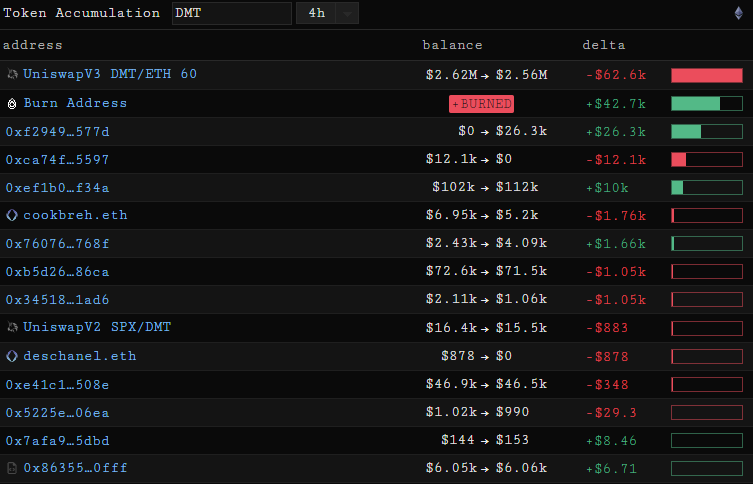
The Token Accumulation element allows us to see the on chain flows for a given token and lookback period:

<figure><img src="https://1941999756-files.gitbook.io/~/files/v0/b/gitbook-x-prod.appspot.com/o/spaces%2FuH6OpygnhtT4R1DM7JI2%2Fuploads%2Foka4B9cLNHWohuux9J4S%2Fimage.png?alt=media&amp;token=f18b7d14-3ac2-4f8a-9ebd-0c101647f2be" alt=""><figcaption></figcaption></figure>

The Token Accumulation element shows both accumulation by contract addresses and externally owned addresses, meaning we can use this element to find buyers/sellers of a given token and equally see which contracts certain token holders are interacting with.

## Token Holders Treemap

The Token Holders Treemap element shows us where the supply of a given token sits in a visual manner:

<figure><img src="https://1941999756-files.gitbook.io/~/files/v0/b/gitbook-x-prod.appspot.com/o/spaces%2FuH6OpygnhtT4R1DM7JI2%2Fuploads%2Ftv72VVafpJf5tb6t7i3Z%2Fimage.png?alt=media&amp;token=5583a195-af1c-449d-a885-33a56d411f48" alt=""><figcaption></figcaption></figure>

We can also view this distribution in log depending on whether we are interested in seeing how tokens are distributed among smaller holders.

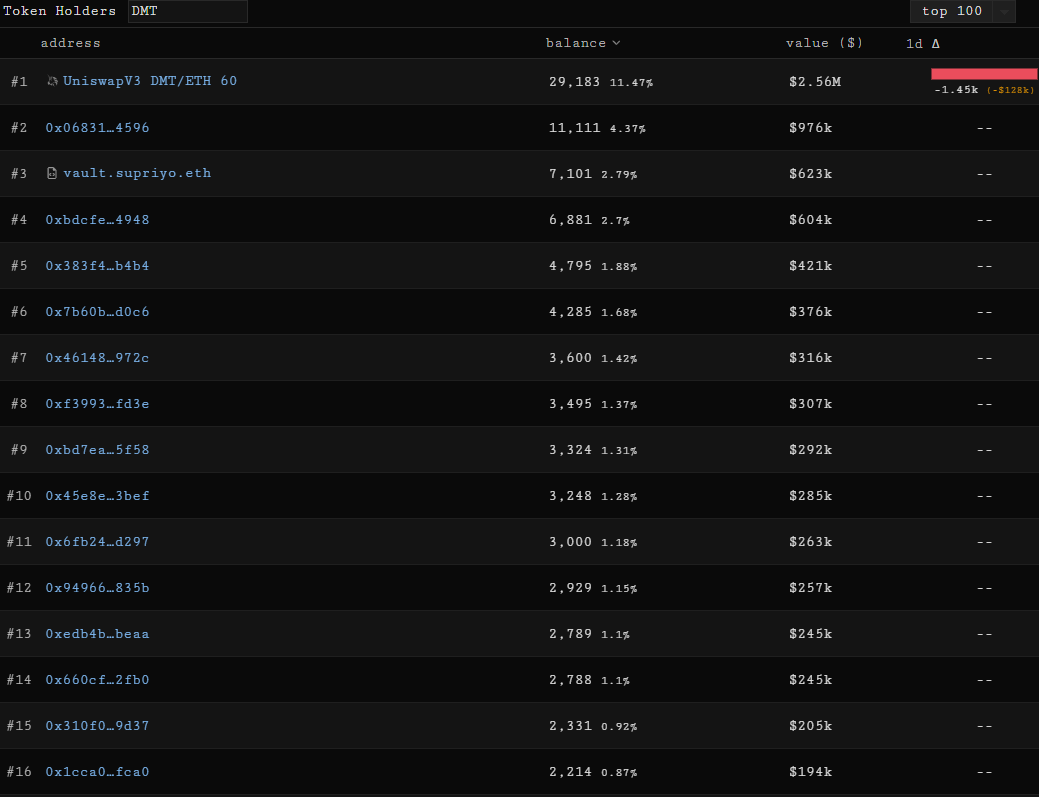
## Token Holders

The Token Holders element shows the holders of a given token along with some key metrics such as the $ value of their holding and deltas with different lookback periods:

<figure><img src="https://1941999756-files.gitbook.io/~/files/v0/b/gitbook-x-prod.appspot.com/o/spaces%2FuH6OpygnhtT4R1DM7JI2%2Fuploads%2FM5oJTveQ1ZczO0gMc3Wv%2Fimage.png?alt=media&amp;token=74193dc2-f7f8-43bd-8092-1831e43f80b6" alt=""><figcaption></figcaption></figure>

## DeFi Volume Monitor

The DeFi Volume monitor element tracks on chain volumes across venues:

<figure><img src="https://1941999756-files.gitbook.io/~/files/v0/b/gitbook-x-prod.appspot.com/o/spaces%2FuH6OpygnhtT4R1DM7JI2%2Fuploads%2FZs73SXfKxhBaqpMZZRZq%2Fimage.png?alt=media&amp;token=e5b52ac4-82fa-4521-b9b2-5ec09153f76d" alt=""><figcaption></figcaption></figure>

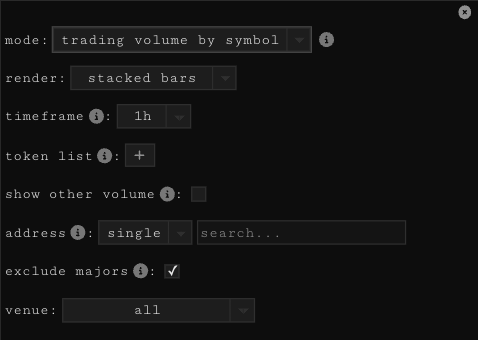
By default it displays the volume being traded of non-major assets (excluding BTC, ETH and Stables) but the element has plenty of customisability. We are able to look at trading volume by symbol as shown above and by venue. We can also visualise lending volume by symbol and venue along with the tx count per contract:

<figure><img src="https://1941999756-files.gitbook.io/~/files/v0/b/gitbook-x-prod.appspot.com/o/spaces%2FuH6OpygnhtT4R1DM7JI2%2Fuploads%2FRYEYwrRoaJjuE6r1l5Jt%2Fimage.png?alt=media&amp;token=b9b9ea4a-72cc-4d42-b79d-3095523d86d0" alt=""><figcaption></figcaption></figure>

We can choose how to visualise the chart and which lookback timeframe we want to look at; we can also filter by token and addresses. The full list of settings can be seen below:

<figure><img src="https://1941999756-files.gitbook.io/~/files/v0/b/gitbook-x-prod.appspot.com/o/spaces%2FuH6OpygnhtT4R1DM7JI2%2Fuploads%2FvzEzTkys4ttAtpFyvoRt%2Fimage.png?alt=media&amp;token=83cb80ca-fa3e-42ca-951a-81033e9018bc" alt=""><figcaption></figcaption></figure>

## Timeseries

The Timeseries element allows us to visualize a number of data sources in a timeseries format (changes over time).

We are able to visualize the following data:

<figure><img src="https://1941999756-files.gitbook.io/~/files/v0/b/gitbook-x-prod.appspot.com/o/spaces%2FuH6OpygnhtT4R1DM7JI2%2Fuploads%2Fpenk6y1hqPr7LwQyXwko%2Fimage.png?alt=media&amp;token=12e93220-e85a-4580-8fdb-b83243f115d6" alt=""><figcaption></figcaption></figure>

We can combine multiple data sources and perform transformations on those data sources to generate interesting insights, for example here we compare TradFi and crypto yields:

<figure><img src="https://1941999756-files.gitbook.io/~/files/v0/b/gitbook-x-prod.appspot.com/o/spaces%2FuH6OpygnhtT4R1DM7JI2%2Fuploads%2FbCdEpzMrS0GicfeKIbdP%2Fimage.png?alt=media&amp;token=68219f8d-0888-4d91-b6a1-461bc62d3076" alt=""><figcaption></figcaption></figure>


# Chaindata Elements

## Tx Watcher

The Tx Watcher element allows us to see the transaction activity from an address or address list over time. This element works for both externally owned addresses and contract addresses should we be interested in monitoring a contract over time.

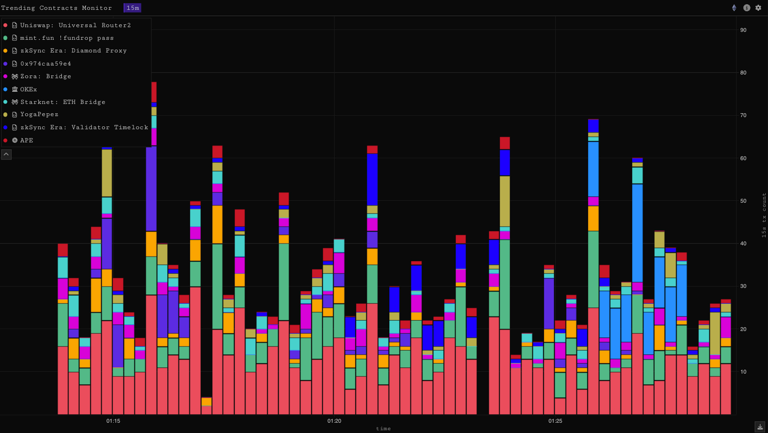
## Trending Contracts

The Trending Contracts element allows us to identify the contracts seeing the most usage (measured by gas usage, ETH in and users) on chain over the past hour or the past day:

<figure><img src="https://1941999756-files.gitbook.io/~/files/v0/b/gitbook-x-prod.appspot.com/o/spaces%2FuH6OpygnhtT4R1DM7JI2%2Fuploads%2FHrqJZMB41S36YgkaTNHY%2Fimage.png?alt=media&amp;token=48488565-4d16-4641-b947-2e7d466223a7" alt=""><figcaption></figcaption></figure>

## Contract Logs

Contract Logs is one of the most customizable and powerful elements within SankoTools.

At a high level it allows the event logs and their topics from any arbitrary contract to be visualized, as such the possibilities are endless and are only bounded by a user's curiosity and creativity!

The element allows us to customize axis, add multiple sources, perform transformations on sources, combine sources, add filters to topics, perform group by operations and more.

## DMT Gas Metrics

The DMT Gas Metrics element exposes various key metrics surrounding the DMT gas market such as the base fee, net issuance over time and other key metrics. We are able to change the lookback period and by scrolling over a given timestamp and clicking on it we can see the contracts which used the most gas in that period.

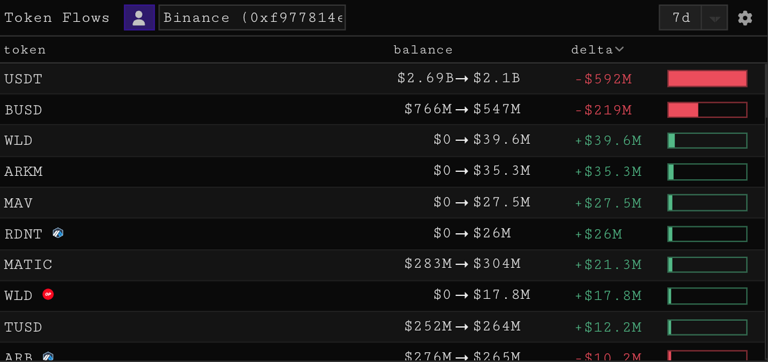
## Address Token Flows

The Address Token Flows element shows the token flows in and out of an address or address list:

<figure><img src="https://1941999756-files.gitbook.io/~/files/v0/b/gitbook-x-prod.appspot.com/o/spaces%2FuH6OpygnhtT4R1DM7JI2%2Fuploads%2FHTP8gVlZBfBbwwQq7XBK%2Fimage.png?alt=media&amp;token=0fc9d675-f51e-42c1-abd8-f70792731159" alt=""><figcaption></figcaption></figure>

In the element settings we can change the lookback period and address or address list we are interested in:

<figure><img src="https://1941999756-files.gitbook.io/~/files/v0/b/gitbook-x-prod.appspot.com/o/spaces%2FuH6OpygnhtT4R1DM7JI2%2Fuploads%2FL804a9a9wVUcsn4IK2l7%2Fimage.png?alt=media&amp;token=7b584c66-a2b2-40e9-b411-5a435fa454e8" alt=""><figcaption></figcaption></figure>

## Tx Viewer

The Tx Viewer element allows us to paste in a transaction hash from any of the chains we cover and inspect that transaction.

## Transfers Table

The Transfers Table element shows the transfers to and from a given address (externally owned or contract) alongside key details related to the transfer:

<figure><img src="https://1941999756-files.gitbook.io/~/files/v0/b/gitbook-x-prod.appspot.com/o/spaces%2FuH6OpygnhtT4R1DM7JI2%2Fuploads%2FECnp0LC2CeG85PuZDH5V%2Fimage.png?alt=media&amp;token=60eb829f-88d7-4999-a7dd-765c09a8dc3a" alt=""><figcaption></figcaption></figure>

## Contract Viewer

The Contract Viewer element allows us to call the read methods on a contract of our choice across the chains we cover:


# Market Data Elements

## Price Candles

At its core the Price Candles component is a charting tool to view and monitor the price and volume of any token by entering its symbol or the relevant pool address via the primary tab in the element settings.

<figure><img src="https://1941999756-files.gitbook.io/~/files/v0/b/gitbook-x-prod.appspot.com/o/spaces%2FuH6OpygnhtT4R1DM7JI2%2Fuploads%2FTFZUYi2BsIsQGR1xEbD7%2Fimage.png?alt=media&amp;token=93d58a07-fc12-424d-a399-f5ad6242bedf" alt=""><figcaption></figcaption></figure>

Graphic overlays such as lines, rectangles, text, or indicators can be displayed using SankoTools as with any other charting tool:

<figure><img src="https://1941999756-files.gitbook.io/~/files/v0/b/gitbook-x-prod.appspot.com/o/spaces%2FuH6OpygnhtT4R1DM7JI2%2Fuploads%2FY02xPqft0FBiSD6GnHO8%2Fimage.png?alt=media&amp;token=26574e2b-195e-4c9b-be04-042d6f1f684a" alt=""><figcaption></figcaption></figure>

## Trades

The trades tab in the element settings features a trade explorer, a table and range selector for looking at top traders and other key metrics, and an overlay which overlays trades on top of the price chart.

<figure><img src="https://1941999756-files.gitbook.io/~/files/v0/b/gitbook-x-prod.appspot.com/o/spaces%2FuH6OpygnhtT4R1DM7JI2%2Fuploads%2FFNQ3iLcBpw2DhTw0tfCV%2Fimage.png?alt=media&amp;token=8c0e4b4b-9d38-4845-aede-4a4b176e6610" alt=""><figcaption><p>Trade Explorer</p></figcaption></figure>

<figure><img src="https://1941999756-files.gitbook.io/~/files/v0/b/gitbook-x-prod.appspot.com/o/spaces%2FuH6OpygnhtT4R1DM7JI2%2Fuploads%2FX1kcyRAQpnXvFuyAHpiE%2Fimage.png?alt=media&amp;token=f9453f6d-8473-4d81-8fb0-560f02869b30" alt=""><figcaption><p>Trades Overlay</p></figcaption></figure>

## Compare

With Compare one can add additional price series' to the chart to look at the relative performance of 2 or more assets:

<figure><img src="https://1941999756-files.gitbook.io/~/files/v0/b/gitbook-x-prod.appspot.com/o/spaces%2FuH6OpygnhtT4R1DM7JI2%2Fuploads%2F1vBr2nKuylAOsshwxXP4%2Fimage.png?alt=media&amp;token=7f02b7c7-04e3-4ebd-a9e5-d9c995689b04" alt=""><figcaption></figcaption></figure>

## Contracts

Sankotools users can overlay arbitrary event logs from any contract using the Contracts feature. We can visualise these event logs both an instances and in bar chart form.

<figure><img src="https://1941999756-files.gitbook.io/~/files/v0/b/gitbook-x-prod.appspot.com/o/spaces%2FuH6OpygnhtT4R1DM7JI2%2Fuploads%2FqGqA2V494xDnW32jZI86%2Fimage.png?alt=media&amp;token=9a81b5d0-bf0f-4624-a599-04b89c82ea39" alt=""><figcaption></figcaption></figure>

<figure><img src="https://1941999756-files.gitbook.io/~/files/v0/b/gitbook-x-prod.appspot.com/o/spaces%2FuH6OpygnhtT4R1DM7JI2%2Fuploads%2FbtbiFvUgPRko4yUxMBrS%2Fimage.png?alt=media&amp;token=2cb789a1-3499-4f98-b934-6546235f5096" alt=""><figcaption><p>Contract Logs shown as instances</p></figcaption></figure>

<figure><img src="https://1941999756-files.gitbook.io/~/files/v0/b/gitbook-x-prod.appspot.com/o/spaces%2FuH6OpygnhtT4R1DM7JI2%2Fuploads%2FZRs1vLXoEOEZ4zjtxl50%2Fimage.png?alt=media&amp;token=30e21d72-acbc-4d6f-aa19-91aacbcf7427" alt=""><figcaption><p>Contract Logs shown as bar chart</p></figcaption></figure>

## Trades Stream

The Trades Stream element is a customizable table showing the trades of a token alongside other key metrics across the venues and chains we cover in a streaming fashion over time:

<figure><img src="https://1941999756-files.gitbook.io/~/files/v0/b/gitbook-x-prod.appspot.com/o/spaces%2FuH6OpygnhtT4R1DM7JI2%2Fuploads%2FI6qQ0UvMGa3Q6Evl8qIO%2Fimage.png?alt=media&amp;token=324848a3-1a3f-4560-9618-7d6476137302" alt=""><figcaption></figcaption></figure>

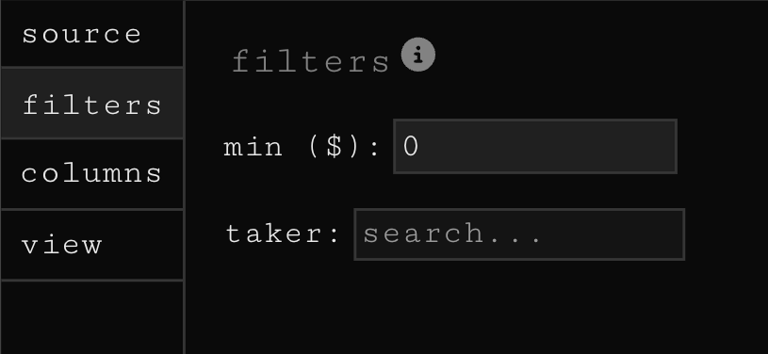
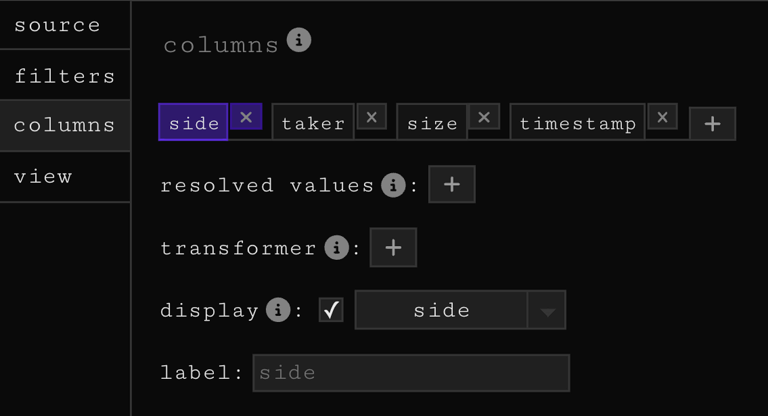
The element can be customized both by adding/removing columns, setting a minimum trade size, filtering by taker address and selecting the venues/chains from which the element pulls trades.

## DeFi Firehose

The DeFi Firehose is similar to Trades Stream in that it is a customisable table showing streaming activity over time but instead of just showing trades, the DeFi Firehose shows DeFi events across the spectrum:

* lend
* repay
* trades
* borrow
* withdraw
* liquidation
* remove liquidity
* add liquidity

in the settings one can filter by:

* minimum event size
* include/exclude a single token or list of tokens
* a single address or address list
* chain (select one or multiple of the chains we cover)
* event (select one of multiple events)
* venue (select one or multiple of the venues we cover)

You can also add a sound to be alerted if a new event occurs according to the criteria defined. The DeFi Firehose is a good way of creating event streams surrounding a token, address or address list of interest. For example we might want to create an address list of the top holders of some token and watch their trades over a certain $ threshold to see whether top holders are buying or selling.

##


# NFT Elements

## NFT Firehose

The NFT firehose shows you exactly what trades are happening right now and it shows you in real time along with all the most relevant information about the trade. It shows you the NFT image, collection name, sale price and whether it was an accepted offer or a listing being bought. It shows you the buyer and the seller, what marketplace the trade took place on and how long ago.

There are a number of settings to choose from depending on what type of trading you generally focus on. Use the price filter to show trades only above a certain threshold, or toggle off some venues to focus on a single marketplace. The firehose is also great for keeping an eye on your favourite traders, filter by a list of addresses or a single trader.

## NFT Price History

The NFT price chart is a comprehensive window into NFT price action. You can use it as simply and stripped back as just tracking the floor price of an NFT, or as a complex and sophisticated technical analysis tool with all of the indicators.

<figure><img src="https://1941999756-files.gitbook.io/~/files/v0/b/gitbook-x-prod.appspot.com/o/spaces%2FuH6OpygnhtT4R1DM7JI2%2Fuploads%2F1RSvRDvPggfnTAlJvDqg%2Fimage.png?alt=media&amp;token=bbb38c70-529f-4217-9e7e-9876e7304c23" alt=""><figcaption></figcaption></figure>

## NFT Volume Monitor

The volume monitor default view shows the top 10 collections by volume for your chosen time period, you can choose to enable pagination in the settings which allows you to see page 2 and 3 (the next 20 collections by volume).

<figure><img src="https://1941999756-files.gitbook.io/~/files/v0/b/gitbook-x-prod.appspot.com/o/spaces%2FuH6OpygnhtT4R1DM7JI2%2Fuploads%2Fp4AokdeBaHC7HXoSqf4I%2Fimage.png?alt=media&amp;token=cc723558-f017-443f-b91f-8e6031dc7a52" alt=""><figcaption></figcaption></figure>

#### There are four other metrics to be viewed using the volume monitor <a href="#there-are-four-other-metrics-to-be-viewed-using-the-volume-monitor" id="there-are-four-other-metrics-to-be-viewed-using-the-volume-monitor"></a>

1. **Chart volume by exchange**
2. **Chart transaction count by collection -** for this view you must create a list of collections you want to track. As floor prices vary wildly between collections, it's useful to gauge interest using other metrics. 1 BAYC selling can account for a whole days volume of a collection with a lower floor price
3. **Chart by mints -** track which collections are minting out in real time
4. **Track royalties by collection**

## NFT Trades stream

The NFT trades element is similar to the firehose except it focuses on a single NFT collection. Pair it alongside your price chart to get a better feel for the flow of a collection and how it pairs with the price action.

## NFT Listings Stream

The listings stream shows the latest NFT listings for the current collection you are looking at. It shows asking price, seller address, it has a link to view the listing and shows how long ago it was listed.

## NFT Holders Table

The holders table shows the top 50 holders of a project, with the option to load 50 more. It shows their current balance and their accumulation or disposal delta over the 1d, 7d and 30d timeframes.

<figure><img src="https://1941999756-files.gitbook.io/~/files/v0/b/gitbook-x-prod.appspot.com/o/spaces%2FuH6OpygnhtT4R1DM7JI2%2Fuploads%2FRwaDdQ85jmOpdoEsBGns%2Fimage.png?alt=media&amp;token=ab332f43-3971-441e-a529-91c51fd66167" alt=""><figcaption></figcaption></figure>

If you click on an address, you will be shown a more granular view of their latest buys and sells as well as a chart showing their balance over time. Below are links to their Parsec address explore layout, Opensea profile and Etherscan, as well as their total portfolio value and top holding.

## Holders Treemap

This element gives a visual representation of the distribution of a holder base, i.e. how many holders are currently holding 1, 2, 3 or more of the same collection.

<figure><img src="https://1941999756-files.gitbook.io/~/files/v0/b/gitbook-x-prod.appspot.com/o/spaces%2FuH6OpygnhtT4R1DM7JI2%2Fuploads%2FIPfb0KAvQSpWPIE48p5T%2Fimage.png?alt=media&amp;token=3f3a315f-d225-45b7-b1ae-ab5ec170e422" alt=""><figcaption></figcaption></figure>

## NFT Collections Table

The NFT collections table provides a high level overview of collection performance, volume and momentum against the broader market. By default it shows:

* Collection image
* Name
* Floor price
* Floor 1h change
* Floor 1d change
* Volume 1d

But there are many other columns that you can add, as well as the ability to filter by all metrics in the settings. Click a column to sort the table by it.

## NFT Portfolio

The portfolio element can be used to track any address or list of addresses. On first glance it shows the current:

* Value of the wallets NFT holdings
* Cost
* Number of NFT's held
* A treemap of holdings by weighting
* A map of address activity

<figure><img src="https://1941999756-files.gitbook.io/~/files/v0/b/gitbook-x-prod.appspot.com/o/spaces%2FuH6OpygnhtT4R1DM7JI2%2Fuploads%2Fj7X9Bws9gHdEvkVQDz3K%2Fimage.png?alt=media&amp;token=906e4878-aab0-4350-ab2a-49f78dc2c670" alt=""><figcaption></figcaption></figure>

Click through the other tabs to see most recent trades, collection inflows and outflows of the wallet by timeframe, and recent mints.

Click on a collection in the collections tab to pull up the wallets holdings, as well as a chart showing where they bought and sold.

<figure><img src="https://1941999756-files.gitbook.io/~/files/v0/b/gitbook-x-prod.appspot.com/o/spaces%2FuH6OpygnhtT4R1DM7JI2%2Fuploads%2F7LOLfLorLCNh2X9Dv19o%2Fimage.png?alt=media&amp;token=a22933bf-5fef-47dd-b925-a932d9545193" alt=""><figcaption></figcaption></figure>

## NFT Collection View

Browse through a collection using traits, price, rarity and recently sold as the filters. If you use 'price low to high', you'll be shown the lowest available listings and which marketplace they are listed on.

<figure><img src="https://1941999756-files.gitbook.io/~/files/v0/b/gitbook-x-prod.appspot.com/o/spaces%2FuH6OpygnhtT4R1DM7JI2%2Fuploads%2FbQ2TQeZo9HzPjyG4kJut%2Fimage.png?alt=media&amp;token=9a0f7ee1-9ad1-4715-85b2-bca67bab80b2" alt=""><figcaption></figcaption></figure>

Click into a listing to see the #ID, all metadata, trades history, and links to current listings.

## NFT Price Comparison

Use this element to compare floor prices amongst different collections, use the `+` button to add more projects, otherwise you can head into the settings and add a list of NFTs.

<figure><img src="https://1941999756-files.gitbook.io/~/files/v0/b/gitbook-x-prod.appspot.com/o/spaces%2FuH6OpygnhtT4R1DM7JI2%2Fuploads%2FfO1tVqETrFQrM36ipV6e%2Fimage.png?alt=media&amp;token=cd3da53c-7f42-46b8-8d31-032cfa23f63b" alt=""><figcaption><p>Default settings - floor, MA 5, returns-linear</p></figcaption></figure>

The settings also contain metric adjustments, compare by `floor`, `max`, `mean` or `volume`. Change the moving average applied to the floor price (smoothing), and choose between a linear, logarithmic or absolute scale.

<figure><img src="https://1941999756-files.gitbook.io/~/files/v0/b/gitbook-x-prod.appspot.com/o/spaces%2FuH6OpygnhtT4R1DM7JI2%2Fuploads%2FlETdBf7oxJPc4naZolI7%2Fimage.png?alt=media&amp;token=bf32d165-f772-46c3-87e9-600b5cccec56" alt=""><figcaption></figcaption></figure>

## NFT Collection Flows

The holder flows element shows you which other collections the holders of your **chosen** collection have been buying and selling over your chosen timeframe.

## Listings profile

The listings profile shows you how many listings there are at each price point for your given collection, by default it shows them grouped by marketplace. The yellow dotted line indicates the current floor price.

<figure><img src="https://1941999756-files.gitbook.io/~/files/v0/b/gitbook-x-prod.appspot.com/o/spaces%2FuH6OpygnhtT4R1DM7JI2%2Fuploads%2Fsnn7d56Hs9fv7R6Usttk%2Fimage.png?alt=media&amp;token=1761682b-4062-454e-880d-06c924c4e3b9" alt=""><figcaption><p>Default view</p></figcaption></figure>

In the settings you can adjust it to show you a cumulative view and choose whether to look at number of listings, or size of ETH buying power needed to push the floor to a certain price point.

<figure><img src="https://1941999756-files.gitbook.io/~/files/v0/b/gitbook-x-prod.appspot.com/o/spaces%2FuH6OpygnhtT4R1DM7JI2%2Fuploads%2FyxMlUKNBHMPSHNmomaLV%2Fimage.png?alt=media&amp;token=f7511777-30f8-4f82-837a-18a0a01303e5" alt=""><figcaption><p>Cumulative view</p></figcaption></figure>


# Chart Elements

## Price Candles

At its core the Price Candles component is a charting tool to view and monitor the price and volume of any token by entering its symbol or the relevant pool address via the primary tab in the element settings.

<figure><img src="https://1941999756-files.gitbook.io/~/files/v0/b/gitbook-x-prod.appspot.com/o/spaces%2FuH6OpygnhtT4R1DM7JI2%2Fuploads%2FMcdhmtYDRgaxWOG57KcX%2Fimage.png?alt=media&amp;token=9e9e2952-901d-4ec9-b06a-ade8572988fc" alt=""><figcaption></figcaption></figure>

Graphic overlays such as lines, rectangles, text, or indicators can be displayed using SankoTools as with any other charting tool:

<figure><img src="https://1941999756-files.gitbook.io/~/files/v0/b/gitbook-x-prod.appspot.com/o/spaces%2FuH6OpygnhtT4R1DM7JI2%2Fuploads%2FyEKnHufOeRCR2rTGrO6r%2Fimage.png?alt=media&amp;token=011f8986-8d24-4a6d-828a-036dd9bbfc2a" alt=""><figcaption></figcaption></figure>

## Interest Rates Chart

The Interest Rates Chart element shows the supply and borrow rates across the full range of assets on the venues SankoTools covers with a customizable lookback period.

We can visualize supply rates, borrow rates, and the spread between them.

<figure><img src="https://1941999756-files.gitbook.io/~/files/v0/b/gitbook-x-prod.appspot.com/o/spaces%2FuH6OpygnhtT4R1DM7JI2%2Fuploads%2FfXd4rIJl6iyXmXdDWhzy%2Fimage.png?alt=media&amp;token=f10aa4fe-73d7-48da-adbc-c34c90c17640" alt=""><figcaption></figcaption></figure>

## Market Cap Visualization

The Market Cap Visualization element provides a macro view of the relative valuations of different tokens as measured by their circulating market capitalization or fully diluted valuation:

<figure><img src="https://1941999756-files.gitbook.io/~/files/v0/b/gitbook-x-prod.appspot.com/o/spaces%2FuH6OpygnhtT4R1DM7JI2%2Fuploads%2FQY0E8AbH2eRQbsKUQBp4%2Fimage.png?alt=media&amp;token=580bfac9-d54e-4423-8a07-29dfeab6aa0c" alt=""><figcaption></figcaption></figure>

We are able to select in the settings whether we want to see by circulating or fully diluted valuation, select only a token list or whether to include "majors" (BTC, ETH, BNB and Stables).

<figure><img src="https://1941999756-files.gitbook.io/~/files/v0/b/gitbook-x-prod.appspot.com/o/spaces%2FuH6OpygnhtT4R1DM7JI2%2Fuploads%2Fvkc68rTO1t7D6olagD8M%2Fimage.png?alt=media&amp;token=f1be9d09-84d8-49d3-bef9-453dfc0284d2" alt=""><figcaption></figcaption></figure>

## Price Comparison

The Price Comparison allows us to visualise the price change for a set of tokens over a given lookback period.

## Contract Logs

At a high level, the Contract Logs element allows the event logs and their topics from any arbitrary contract to be visualized. The element allows us to customise axis, add multiple sources, perform transformations on sources, combine sources, add filters to topics, perform group by operations and plenty more. It has a relatively steep learning curve but once mastered it is a very powerful tool.


# Liquidity Elements

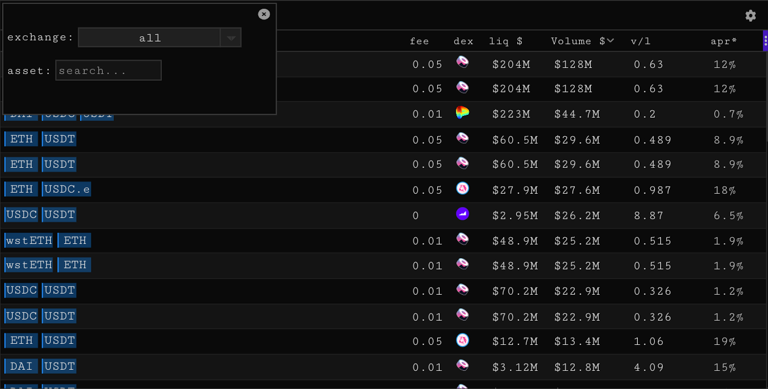
## Liquidity Pools

The Liquidity Pools element displays various key liquidity metrics for AMM pools. We can add, remove, and reorder columns and filter by exchange and/or asset:

<figure><img src="https://1941999756-files.gitbook.io/~/files/v0/b/gitbook-x-prod.appspot.com/o/spaces%2FuH6OpygnhtT4R1DM7JI2%2Fuploads%2Fj7y3ut6rDS7ACzVZvsdp%2Fimage.png?alt=media&amp;token=2487e529-0e79-4114-bd97-50cbec7dc42b" alt=""><figcaption></figcaption></figure>

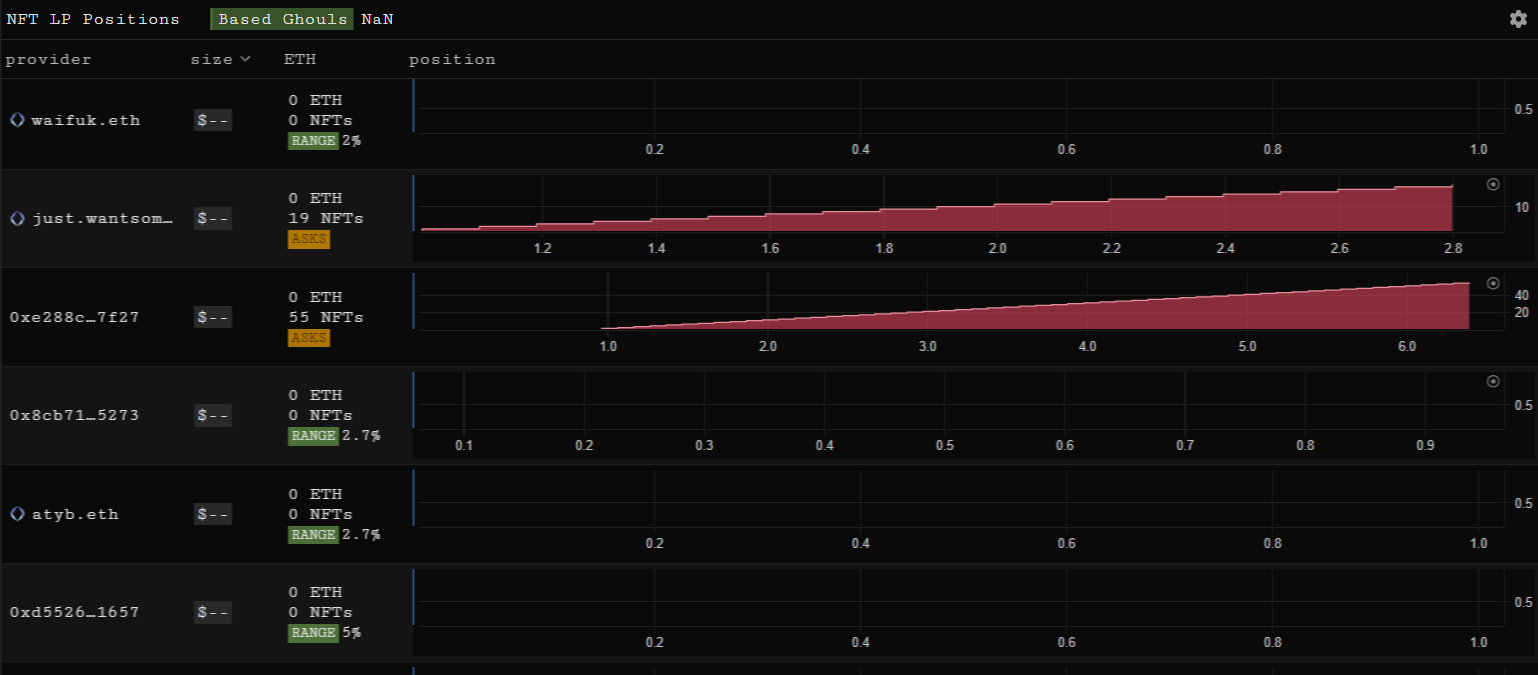
## NFT LP Positions

The NFT LP Positions element allows you to view LP positions by NFT collection or provider:

<figure><img src="https://1941999756-files.gitbook.io/~/files/v0/b/gitbook-x-prod.appspot.com/o/spaces%2FuH6OpygnhtT4R1DM7JI2%2Fuploads%2FsqdrV4ckwy2nnv4emP9O%2Fimage.png?alt=media&amp;token=8c29ea19-8be6-40a4-84b5-39e9266f8fff" alt=""><figcaption></figcaption></figure>

## NFT Pools

The NFT Pools element reveals the volume, value, and number of NFTs, and volume share for NFT collections with liquidity pools on sudoswap:

<figure><img src="https://1941999756-files.gitbook.io/~/files/v0/b/gitbook-x-prod.appspot.com/o/spaces%2FuH6OpygnhtT4R1DM7JI2%2Fuploads%2FpzfCx3YO2S7gJPcrDgz1%2Fimage.png?alt=media&amp;token=3c315e8b-506b-4077-bb37-34e1bb01a9b4" alt=""><figcaption></figcaption></figure>


# Portfolio Elements

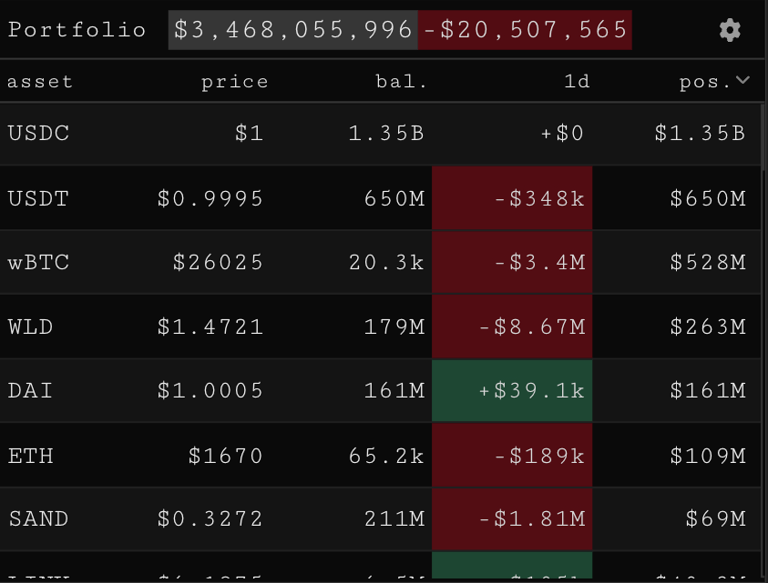
## Portfolio Assets

The Portfolio Assets elements shows a comprehensive list of assets for a given address:

<figure><img src="https://1941999756-files.gitbook.io/~/files/v0/b/gitbook-x-prod.appspot.com/o/spaces%2FuH6OpygnhtT4R1DM7JI2%2Fuploads%2FFvgb6L36ow5ayo8xoY08%2Fimage.png?alt=media&amp;token=96bc071b-2b06-4870-b5d9-577414297c3e" alt=""><figcaption></figcaption></figure>

We can make various adjustments in the element settings such as viewing our own connected wallet, a custom wallet address or the combined portfolio for an address list. Equally we can change the denomination from USD to ETH alongside additional adjustments.

## Trades/Positions

The Trades/Positions element shows the trades of the wallet you have connected to SankoTools. It can be a useful addition to a portfolio monitoring layout:

<figure><img src="https://1941999756-files.gitbook.io/~/files/v0/b/gitbook-x-prod.appspot.com/o/spaces%2FuH6OpygnhtT4R1DM7JI2%2Fuploads%2FY5yoSku2DK03m0ddTTis%2Fimage.png?alt=media&amp;token=b7699de6-a589-4d2d-a9d8-3c69f682ff5a" alt=""><figcaption></figcaption></figure>

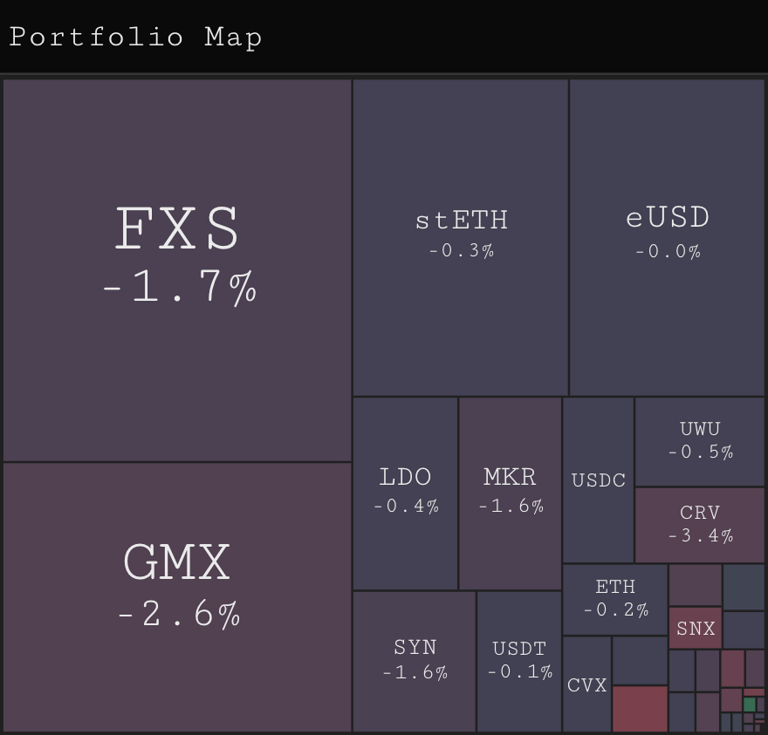
## Portfolio Map

The Portfolio Map displays a visualization of the assets within the wallet we have connected to SankoTools:

<figure><img src="https://1941999756-files.gitbook.io/~/files/v0/b/gitbook-x-prod.appspot.com/o/spaces%2FuH6OpygnhtT4R1DM7JI2%2Fuploads%2FZmauR46uLrZZOKEbwdwk%2Fimage.png?alt=media&amp;token=5c1c5a74-e7aa-40b2-8ab4-859cdf7d1e7b" alt=""><figcaption></figcaption></figure>

## NFT portfolio

The portfolio element can be used to track any address or list of addresses. On first glance it shows the current:

* Value of the wallets NFT holdings
* Cost
* Number of NFT's held
* A treemap of holdings by weighting
* A map of address activity

<figure><img src="https://1941999756-files.gitbook.io/~/files/v0/b/gitbook-x-prod.appspot.com/o/spaces%2FuH6OpygnhtT4R1DM7JI2%2Fuploads%2FWi0SJb9Mk5SebvyIKNMk%2Fimage.png?alt=media&amp;token=f25b4065-cdd7-4114-888d-174de27f591c" alt=""><figcaption></figcaption></figure>

Click through the other tabs to see most recent trades, collection inflows and outflows of the wallet by timeframe, and recent mints.

Click on a collection in the collections tab to pull up the wallets holdings, as well as a chart showing where they bought and sold.

## Address Token Flows

The Address Token Flows element shows the token flows in and out of an address or address list across chains:

<figure><img src="https://1941999756-files.gitbook.io/~/files/v0/b/gitbook-x-prod.appspot.com/o/spaces%2FuH6OpygnhtT4R1DM7JI2%2Fuploads%2Fcg6ej9CG6NI94dzb1ewi%2Fimage.png?alt=media&amp;token=15b28692-02e6-4131-90b7-6eabac13f3cc" alt=""><figcaption></figcaption></figure>

In the element settings we can change the lookback period and address or address list we are interested in:

<figure><img src="https://1941999756-files.gitbook.io/~/files/v0/b/gitbook-x-prod.appspot.com/o/spaces%2FuH6OpygnhtT4R1DM7JI2%2Fuploads%2FJ6PaqF6krjRor70HlaZK%2Fimage.png?alt=media&amp;token=e4ad38d2-cd6d-4621-b0fc-fd184c91b879" alt=""><figcaption></figcaption></figure>


# Utility Elements

## Address Controller

The Address Controller element allows us to check whether we have certain addresses labelled within SankoTools and to create new address labels.

We paste in an address of interest, check whether it has a preexisting label and then create a private label:

<figure><img src="https://1941999756-files.gitbook.io/~/files/v0/b/gitbook-x-prod.appspot.com/o/spaces%2FuH6OpygnhtT4R1DM7JI2%2Fuploads%2FHI7hxBeawxyogwO0jk6D%2Fimage.png?alt=media&amp;token=c920fb00-2bf5-41ef-95d1-539a2f514f39" alt=""><figcaption></figcaption></figure>

## Notepad

The Notepad element is simply a resizable notepad we can add to a layout for extra functionality or to explain how to use certain elements should we wish to share the layout:

<figure><img src="https://1941999756-files.gitbook.io/~/files/v0/b/gitbook-x-prod.appspot.com/o/spaces%2FuH6OpygnhtT4R1DM7JI2%2Fuploads%2FuosusVdCLZCSiHkMjDCf%2Fimage.png?alt=media&amp;token=22ed4156-e2a3-4c10-9eb1-a0ecb5d6ff99" alt=""><figcaption><p>wait, sankochain is real?</p></figcaption></figure>


# Run a Sanko node

See the instructions here on how to run a node on Sanko (also an RPC handler)\
<https://constellationlabs.notion.site/External-Sanko-Replica-Guide-7bd40af8c8644f4381e214285f9e456a>


# The Dream Machine Token (DMT)

The Dream Machine Token (DMT) is the native token of Sanko. DMT has several functions: it powers Sanko games, acts as a medium of exchange, and as a settlement token.

DMT serves as the cornerstone of in-game economies, facilitating transactions and exchanges of value between players, developers, and other stakeholders. Akin to the per-play token of traditional arcades, DMT enables access to in-game features, items, and services.

DMT also serves as the gas token used in all Sanko transactions, underpinning the entire transactional framework of the chain. Every transaction executed on Sanko burns DMT, contributing to its deflationary nature and increasing its scarcity over time. DMT is the backbone of Sanko's transparent transactional infrastructure, and it plays a vital role in ensuring the fairness of user interactions within gaming environments.

<br>


# What is $DMT?

The native cryptographically-secure fungible protocol token of the Dream Machine platform, Dream Machine Token (ticker symbol **$DMT**), that powers Dream Machine games is a transferable representation of attributed utility functions specified in the protocol/code of the Dream Machine platform, and which is designed to be used solely as an interoperable utility token thereon.


# How to Purchase $DMT on Arbitrum

$DMT can be purchased via [Camelot](https://app.camelot.exchange/?token2=0x8B0E6f19Ee57089F7649A455D89D7bC6314D04e8) on Arbitrum One, [Uniswap](https://app.uniswap.org/swap?outputCurrency=0x0B7f0e51Cd1739D6C96982D55aD8fA634dd43A9C\&chain=ethereum) on Ethereum, and SankoSwap on Sanko Mainnet.

## Purchasing $DMT on Camelot

1. Navigate to Camelot Exchange (<https://app.camelot.exchange/>)

<figure><img src="https://1941999756-files.gitbook.io/~/files/v0/b/gitbook-x-prod.appspot.com/o/spaces%2FuH6OpygnhtT4R1DM7JI2%2Fuploads%2FGP4dltN5TdkL5EDYVgqt%2Fimage.png?alt=media&amp;token=880ee64e-ecb0-41c1-b3e0-3b0ffba8d607" alt=""><figcaption></figcaption></figure>

2. Click the dropdown for the bottom token, enter $DMT's Arbitrum contract address (0x8b0e6f19ee57089f7649a455d89d7bc6314d04e8), and select DMT.

<figure><img src="https://1941999756-files.gitbook.io/~/files/v0/b/gitbook-x-prod.appspot.com/o/spaces%2FuH6OpygnhtT4R1DM7JI2%2Fuploads%2Fz0nLrSmUU5EIufrG6gnI%2Fcamelot%201.png?alt=media&amp;token=8bfd9d17-88c8-4421-9ecd-c9036c8073ea" alt="" width="461"><figcaption></figcaption></figure>

<figure><img src="https://1941999756-files.gitbook.io/~/files/v0/b/gitbook-x-prod.appspot.com/o/spaces%2FuH6OpygnhtT4R1DM7JI2%2Fuploads%2FsVJyzdp975xj8u9pS30M%2Fcamelot%202.png?alt=media&amp;token=3ce8fa7d-4a4c-40e5-a2dd-6d5595079eaa" alt=""><figcaption></figcaption></figure>

3. Click the dropdown for the asset on top of the interface and enter the token you'd like to swap for DMT.

   *Note: $DMT's most liquid pool on Arbitrum resides on Camelot V3, where $DMT is paired with USDC.e (USDC.e Contract Address:* 0xFF970A61A04b1cA14834A43f5dE4533eBDDB5CC8)

<figure><img src="https://1941999756-files.gitbook.io/~/files/v0/b/gitbook-x-prod.appspot.com/o/spaces%2FuH6OpygnhtT4R1DM7JI2%2Fuploads%2FaeK6p8BkfuRcE5MtXJII%2Fcamelot%203.png?alt=media&amp;token=4c0c6b75-c730-4f30-aaf9-e19c6ffc0a23" alt="" width="465"><figcaption></figcaption></figure>

<figure><img src="https://1941999756-files.gitbook.io/~/files/v0/b/gitbook-x-prod.appspot.com/o/spaces%2FuH6OpygnhtT4R1DM7JI2%2Fuploads%2FEmL3FaXBPNwepVCEWREf%2Fcamelot%204.png?alt=media&amp;token=34881f74-28a2-4f74-8f3d-622c58be82eb" alt=""><figcaption></figcaption></figure>

4. Approve the token you're using to purchase $DMT to allow Camelot to make the swap, then select Swap and confirm the transaction in your wallet.


# How to Purchase $DMT on Ethereum

$DMT's [most liquid pool](https://etherscan.io/address/0xe3170D65018882a336743a9c396C52eA4B9c5563) on Ethereum Mainnet can be found on [Uniswap V3](https://app.uniswap.org/swap?outputCurrency=0x0B7f0e51Cd1739D6C96982D55aD8fA634dd43A9C\&chain=ethereum).

## Purchasing $DMT on Uniswap

1. Navigate to Uniswap's front-end (<https://app.uniswap.org/swap>)

<figure><img src="https://1941999756-files.gitbook.io/~/files/v0/b/gitbook-x-prod.appspot.com/o/spaces%2FuH6OpygnhtT4R1DM7JI2%2Fuploads%2FVLKzTq96gCYHofqWMWIV%2Fimage.png?alt=media&amp;token=61f170c9-4213-40a7-987c-27756829d234" alt="" width="510"><figcaption></figcaption></figure>

2. Click "Select token", enter $DMT's Ethereum contract address (0x0b7f0e51cd1739d6c96982d55ad8fa634dd43a9c), and select DMT.

<figure><img src="https://1941999756-files.gitbook.io/~/files/v0/b/gitbook-x-prod.appspot.com/o/spaces%2FuH6OpygnhtT4R1DM7JI2%2Fuploads%2FWpIaRblFBychDzMSOApN%2Funiswap%201.png?alt=media&amp;token=08d3b1f9-c46f-4b4d-9c31-78f72fdc9df4" alt="" width="510"><figcaption></figcaption></figure>

<figure><img src="https://1941999756-files.gitbook.io/~/files/v0/b/gitbook-x-prod.appspot.com/o/spaces%2FuH6OpygnhtT4R1DM7JI2%2Fuploads%2FN8SeL5LxMYLA5bpybVnf%2Funiswap%202.png?alt=media&amp;token=ff094ddd-7401-4206-8ed1-9684325bda4b" alt=""><figcaption></figcaption></figure>

3. Click the dropdown for the asset on top of the interface and enter the token you'd like to swap for $DMT.

   *Note: In $DMT's most liquid pool on Uniswap V3, it is paired with WETH (WETH Ethereum Contract Address:* 0xc02aaa39b223fe8d0a0e5c4f27ead9083c756cc2)

<figure><img src="https://1941999756-files.gitbook.io/~/files/v0/b/gitbook-x-prod.appspot.com/o/spaces%2FuH6OpygnhtT4R1DM7JI2%2Fuploads%2FkkL1FafpwSCKcCVYbKsR%2Funiswap%203.png?alt=media&amp;token=7c4a6ad4-a848-4209-91d4-52c8e5f2f5fb" alt="" width="488"><figcaption></figcaption></figure>

<figure><img src="https://1941999756-files.gitbook.io/~/files/v0/b/gitbook-x-prod.appspot.com/o/spaces%2FuH6OpygnhtT4R1DM7JI2%2Fuploads%2Fs0Hw8Bi57tKzuBx3yNET%2Funiswap%204.png?alt=media&amp;token=5f611455-694d-46cc-9340-1fa0df65c1ab" alt="" width="375"><figcaption></figcaption></figure>

4. Approve the token that you're using to purchase $DMT to allow Camelot to make the swap, then select Swap and confirm the transaction in your wallet.

To prevent sandwich attacks from being perpetrated on swaps on Ethereum Mainnet, it may be prudent to consider using an MEV blocker.


# The Dream Machine

<figure><img src="https://content.gitbook.com/content/uH6OpygnhtT4R1DM7JI2/blobs/vWqQlEDLX6qqIYPHdZqy/Screenshot%202024-02-11%20at%207.58.04%E2%80%AFAM.png" alt=""><figcaption><p>Homepage of the Dream Machine</p></figcaption></figure>

**WHAT IS THE DREAM MACHINE?**

[The Dream Machine](https://www.sankodreammachine.net) is a blockchain-based game console and arcade built natively on Arbitrum, for NFT and token-based gaming and social networking. Powered by Sanko GameCorp©, The Dream Machine will be a wide library of unique gaming experiences on Sanko. The Dream Machine will be migrated to Sanko's L3 for mainnet release.


# Tokenomics

* 30% Public Launch
* 25% LP + Staking Rewards
* 20% Sanko Labs
* 10% Development Fund
* 7% Airdrop NFT Holders
* 5% MBD
* 3% Launchpad

**PUBLIC LAUNCH**

The initial launch will be for 30% of token supply at a $10m fully-diluted valuation. The launch will have a $3m hard cap.

**LAUNCH DYNAMICS**

The launch will proceed in 2 stages: (1) The initial Whitelist sale and (2) the fully Public sale. The Whitelist sale period will be open exclusively to qualified wallets for 24 hours. Wallets will qualify by

1. Holding Streets of Milady or Sakura Park
2. Holding Milady Maker NFTs
3. xGRAIL stakers & holders
4. Holding Remilio, Pixelady and Schizoposter NFTs

The whitelist will have a 20% discount to public sale. There will be a $300k floor for price, after which price discovery begins. After the whitelist sale period ends, the public launch begins. The public launch will have a $3m hard cap. When the public launch period ends or the cap is reached, launch participants will be able to claim their allocations. The airdrop claim will begin and trading and allow staking of $DMT to participate in ecosystem activities/features.

**CIRCULATING SUPPLY AT GENESIS**

* Total supply: 1,000,000 $DMT
* 30% of the supply is sold through the public launch
* 7% of the token supply is airdropped to NFT holders
* 370,000 circulating $DMT at genesis event
* Additional supply will be emitted later via rewards program for active participants, as well as vesting of locked tokens

**FUNDS DISTRIBUTION**

50% of launch proceeds will go directly to deepening liquidity for $DMT so that users may more easily acquire the token, 10% to LP rewards fund (to reward active liquidity providers), and 10% to the liquidity fund. The other 30% will be held by Sanko Labs for further product and business development.

**GAMEPLAY REWARDS**

Gameplay rewards are paid to players in $DMT at the end of every rewards epoch. They are distributed to players for high scores and total gameplay. Rewards epochs for gameplay are every 10 days, and results for gameplay are filtered for organic activity, to discourage botting.

**LIQUIDITY MINING**

To ensure that users receive access to $DMT so that they may utilise these for platform services, other users would need to be incentivised to become liquidity providers and stake their digital asset pairs (e.g. USDT/$DMT) into the decentralised market making pools to provide the necessary liquidity for transactions. As compensation for opportunity costs, these liquidity providers which help to promote adoption of the Dream Machine platform by staking or including assets to liquidity pools in exchange for LP tokens would be rewarded with $DMT (i.e. "liquidity mining" on the Dream Machine platform), according to each user's relative contribution after various adjustment and correction parameters.

**VESTING SCHEDULE**

Of the tokens reserved for Sanko Labs and the development fund 5% will be released every vesting epoch, which happens every 10 days. This will begin 1 month from the sale date. The tokens for Sanko Project Contributors will then finish vesting 200 days after 1 month from genesis.

**NFT STAKING**

Staking Sanko NFTs to earn $xDMT will be introduced later in the protocol roadmap.

**STAKING $DMT**

Staking powers the Dream Machine platform. $DMT functions as a digital loyalty membership which embeds a licence granting active participants exclusive access to selected products or services, so users will be classified into different tiers based on the amount of $DMT staked, user activity, and/or volume of transactions. The premium membership tiers would allow users to get greater access to the ecosystem features and more preferential terms, for example certain premium functionalities, exclusive products/services, priority for events, or greater or more unique transaction rewards. Through staking $DMT and accessing exclusive content, users would be able to earn unique rewards (including $DMT rewards) for being a valued member of the Dream Machine gaming platform.

The rewards for active users are paid continuously from the percentage of token supply that is assigned to user participation rewards (from genesis). Rewards may be claimed at any time. Staked tokens are subject to a 14 day unbonding period. If you decide to unstake $DMT, you will have to wait 14 days before it returns to your wallet.


# Connect to Sanko Testnet

<figure><img src="https://content.gitbook.com/content/uH6OpygnhtT4R1DM7JI2/blobs/KsA6DnfI1fuobIjRgoSf/sankologo%20gif.gif" alt="" width="250"><figcaption></figcaption></figure>

## Using the Sanko Hub Page

1. Navigate to our [Hub Page](https://sanko-arb-sepolia.hub.caldera.xyz/)
2. Click the **Connect** button in the *Your Wallet* section, and you will be prompted to switch to the Sanko Network

<figure><img src="https://content.gitbook.com/content/uH6OpygnhtT4R1DM7JI2/blobs/hm1ha93Pnf3VG1nVZCGD/image.png" alt=""><figcaption></figcaption></figure>

## Manually via Metamask

You can add the network manually via the following details:

* Network Name: Sanko Testnet
* RPC URL: <https://sanko-arb-sepolia.rpc.caldera.xyz/http>
* Chain ID: 1992
* Currency Symbol: tDMT


# Deploy on Sanko Testnet

The following pages detail the process of deploying smart contracts to Sanko Testnet.


# Foundry

## What is Foundry?

Foundry is a toolset for Ethereum development written in Rust that assists developers in managing dependencies, compiling projects, running tests, deploying contracts, and interacting with blockchains through the command line interface.

Additionally, Foundry can directly communicate with Caldera's Ethereum API, enabling the use of Foundry to deploy smart contracts into the Caldera network.

## Get Started with Foundry

1. Install Foundry
   * Linux or MaxOS

     ```
     curl -L https://foundry.paradigm.xyz | bashfoundryup
     ```
   * Windows

     ```
     curl --proto '=https' --tlsv1.2 -sSf https://sh.rustup.rs/ | shcargo install --git https://github.com/foundry-rs/foundry foundry-cli anvil --bins --locked
     ```
2. Create a project

   ```
   forge init foundry
   ```
3. Navigate to the Source in the project and create your smart contract

   ```
   cd srctouch MyToken.sol
   ```
4. Input your smart contract or use the sample contract below.

   ```
   // SPDX-License-Identifier: MIT// compiler version must be greater than or equal to 0.8.17 and less than 0.9.0pragma solidity ^0.8.17; contract HelloWorld {    string public greet = "Hello World!";}
   ```
5. Install OpenZeppelin contracts as a dependency

   ```
   forge install OpenZeppelin/openzeppelin-contracts
   ```
6. Compile contract

   ```
   forge build
   ```

## Deploying Smart Contracts

Deploying a contract with Forge is a simple process that can be done with a single command. However, it requires an RPC endpoint, a private key that has funds, and any arguments for the constructor of the contract.

For example, the `MyToken.sol` contract requires an initial supply of tokens to be specified in its constructor, so the command to deploy it on a network will include the argument of 100.

To deploy the `MyToken.sol` contract, use the command that corresponds to the Caldera chain's RPC URL while running the `forge create` command:

```
forge create --rpc-url "https://sanko-arb-sepolia.rpc.caldera.xyz/http"--constructor-args 100 \--private-key YOUR_PRIVATE_KEY \src/MyToken.sol:MyToken 
```


# Hardhat

## What is Hardhat?

Hardhat is a development environment for Ethereum that helps developers manage and automate the common tasks involved in building smart contracts and decentralized applications. It can directly interact with Caldera's Ethereum API, allowing for the deployment of smart contracts into the Caldera network.

Additionally, Hardhat is a comprehensive set of tools for creating Ethereum-based software, which includes various components that aid in editing, compiling, debugging, and deploying smart contracts and decentralized applications. All of these components work together to create a complete development environment.

## Creating a Hardhat Project

1. Create a directory for your project:

   ```
   mkdir hardhat && cd hardhat
   ```
2. Initialize the project, which will create a `package.json` file

   ```
   npm init -y
   ```
3. Install Hardhat

   ```
   npm install hardhat
   ```
4. Create a project

   ```
   npx hardhat
   ```
5. Create an empty `hardhat.config.js` and install the Ethers plugin to use the Ethers.js library to interact with the network.

   ```
   npm install @nomiclabs/hardhat-ethers ethers
   ```

## Creating Your Smart Contract

1. Create a `contracts` directory

   ```
   mkdir contracts && cd contracts
   ```
2. Create `your_contract.sol` file in `contracts` directory

   ```
   touch your_contract.sol
   ```

## Creating Your Configuration File

Modify the Hardhat configuration file and create a secure file to store your private key in.

1. Create a `secrets.json` file to store your private key

   ```
   touch secrets.json
   ```
2. Add your private key to `secrets.json`

   ```
   {    "privateKey": "YOUR-PRIVATE-KEY-HERE"}
   ```
3. Add the file to your project's `.gitignore`, and never reveal your private key.
4. Modify the `hardhat.config.js` file

   * Import the Ethers.js plugin
   * Import the `secrets.json` file
   * Inside the `module.exports` add the Caldera network configuration

   ```
   require('@nomiclabs/hardhat-ethers');const { privateKey } = require('./secrets.json'); module.exports = {solidity: "0.8.1",defaultNetwork: "rinkeby",networks: {    rinkeby: {        url: "https://eth-rinkeby.alchemyapi.io/v2/123abc123abc123abc123abc123abcde",        accounts: [privateKey]    },    sanko: {        url: "https://sanko-arb-sepolia.rpc.caldera.xyz/http",  // RPC URL Here        chainId: 1992 , // ChainID Here    }},}
   ```

## Deploying Your Smart Contract

1. Compile the contract

   ```
   npx hardhat compilejs
   ```
2. Create a new directory for the script and name it scripts and add a new file to it called `deploy.js`

   ```
   mkdir scripts && cd scriptstouch deploy.js
   ```
3. Create a deployment script, like the one below

   ```
   async function main() {// 1. Get the contract to deployconst Your_Contract = await ethers.getContractFactory('your_contract');console.log('Deploying Your_Contract...'); // 2. Instantiating a new smart contractconst your_contract = await Your_Contract.deploy(); // 3. Waiting for the deployment to resolveawait your_contract.deployed(); // 4. Use the contract instance to get the contract addressconsole.log('Your_Contract deployed to:', your_contract.address);} main().then(() => process.exit(0)).catch((error) => {    console.error(error);    process.exit(1);});
   ```
4. Deploy `your_contract.sol` using the command below

   ```
   npx hardhat run scripts/deploy.js --network sanko
   ```


# Remix

## What is Remix?

Remix Project is a robust set of tools that can be used by individuals of any skill level throughout the entire process of developing contracts, and it also serves as an educational platform for learning and experimenting with Ethereum.

## Getting Started with Remix

1. Visit Remix to get started.
2. Under **Featured Plugins**, select **Solidity**.
3. Navigate to the **File Explorer** and click "**+**" to create a Smart Contract
4. Input your smart contract or use the sample contract below.

```
// SPDX-License-Identifier: MIT// compiler version must be greater than or equal to 0.8.17 and less than 0.9.0pragma solidity ^0.8.17; contract HelloWorld {    string public greet = "Hello World!";}
```

5. Navigate to the **Compile** sidebar option and click Compile.

## Deploying Your Smart Contract

Once you have written your Smart Contract in Remix, you can navigate to the sidebar option to Compile your contract.

1. Change the top **ENVIRONMENT** dropdown from "**Javascript**" to "**Injected Web3**"
2. This will take you MetaMask - Press connect in Metamask to allow Remix access.
3. Add your network to Metamask using these parameters from Sanko Testnet:
   * Network Name: Sanko Testnet
   * New RPC URL: [https://sanko-arb-sepolia.rpc.caldera.xyz/http(opens in a new tab)](https://sanko-arb-sepolia.rpc.caldera.xyz/http)
   * Chain ID: 1992
   * Currency Symbol: tDMT
   * Block Explorer URL: [https://sanko-arb-sepolia.explorer.caldera.xyz/(opens in a new tab)](https://sanko-arb-sepolia.explorer.caldera.xyz/)

<br>


# Pyth Entropy (RNG)

<figure><picture><source srcset="/files/N5OCIrEw9vVdGGV9I6tW" media="(prefers-color-scheme: dark)"><img src="https://1941999756-files.gitbook.io/~/files/v0/b/gitbook-x-prod.appspot.com/o/spaces%2FuH6OpygnhtT4R1DM7JI2%2Fuploads%2FTJSPlpKukTwTawwYRLJE%2FPyth%20Logotype_Light%20copy.png?alt=media&amp;token=6791e3a3-4101-4381-a182-8881c05f2698" alt="" width="375"></picture><figcaption></figcaption></figure>

To generate random numbers in your smart contract, use Pyth Network's [Entropy protocol](https://docs.pyth.network/entropy).&#x20;

Generate random numbers guide:

<https://docs.pyth.network/entropy/generate-random-numbers/evm>

\
\
Entropy contract addresses:

```
Sanko Mainnet:
0x5744Cbf430D99456a0A8771208b674F27f8EF0Fb
```

```
Sanko Testnet:
0x5744Cbf430D99456a0A8771208b674F27f8EF0Fb
```

Source: <https://docs.pyth.network/entropy/contract-addresses>


# FAQ

**What wallets will Sanko be compatible with?**

Sanko seamlessly integrates with ETH wallets that are compatible with Arbitrum. Moreover, the Sanko Foundation is actively involved in enhancing the wallet experience by incorporating abstracted features. This innovative approach aims to utilize email and/or social accounts for wallet authentication and recovery purposes. By leveraging these widely used platforms, our goal is to provide a streamlined and user-friendly authentication process for our users.

**Is Sanko audited?**

Sanko is built using the Arbitrum Nitro codebase, which undergoes continuous rigorous auditing processes.

**What strategy will you implement to bring non-crypto natives into your ecosystem?**

Sanko aims to be open-source for all types of developers building both on-chain games and more traditional video games with on-chain backend integration. Developers can choose to incorporate Sanko according to their preferences. As the Sanko Foundation focuses on collaborating with top-tier, experienced game developers, we are confident that the experiences they create will effectively attract both traditional gamers and non-crypto players.

If you have any questions feel free to reach out to <info@sankogamecorp.net>!


# Notice

PLEASE READ THE ENTIRETY OF THIS "NOTICE" SECTION CAREFULLY. NOTHING HEREIN CONSTITUTES LEGAL, FINANCIAL, BUSINESS OR TAX ADVICE AND YOU ARE STRONGLY ADVISED TO CONSULT YOUR OWN LEGAL, FINANCIAL, TAX

$DMT is a functional multi-utility token which will be used as the medium of exchange between participants on the Dream Machine platform in a decentralised manner. The goal of introducing $DMT is to provide a convenient and secure mode of payment and settlement between participants who interact within the ecosystem on the Dream Machine platform without any intermediaries such as centralised third party entity/institution/credit. It is not, and not intended to be, a medium of exchange accepted by the public (or a section of the public) as payment for goods or services or for the discharge of a debt; nor is it designed or intended to be used by any person as payment for any goods or services whatsoever that are not exclusively provided by the issuer. $DMT does not in any way represent any shareholding, ownership, participation, right, title, or interest in the Company, the Distributor, their respective affiliates, or any other company, enterprise or undertaking, nor will $DMT entitle token holders to any promise of fees, dividends, revenue, profits or investment returns, and are not intended to constitute securities in the Cayman Islands, the British Virgin Islands, Singapore or any relevant jurisdiction. $DMT may only be utilised on the Dream Machine platform, and ownership of the same carries no rights, express or implied, other than the right to use $DMT as a means to enable usage of and interaction within the Dream Machine platform. The secondary market pricing of $DMT is not dependent on the effort of the Sanko Project Contributors, and there is no token functionality or scheme designed to control or manipulate such secondary pricing.

Further, $DMT provides the economic incentives which will be distributed to encourage users to exert efforts towards contribution and participation in the ecosystem on the Dream Machine platform, thereby creating a mutually beneficial system where every participant is fairly compensated for its efforts. $DMT is an integral and indispensable part of the Dream Machine platform, because without $DMT, there would be no incentive for users to expend resources to participate in activities or provide services for the benefit of the entire ecosystem on the Dream Machine platform. Given that additional $DMT will be awarded to a user based only on its actual usage, activity and efforts made on the Dream Machine platform and/or proportionate to the frequency and volume of transactions, users of the Dream Machine platform and/or holders of $DMT which did not actively participate will not receive any $DMT incentives.

$DMT functions like the tokens and quarters of a traditional arcade that powers the games on the Dream Machine. It is the "per-play" token and the platform currency for in-game economies and micro-transactions such as items, power-ups, and character and stage unlocks. Rewards from gameplay and challenges are paid out to players in $DMT. $DMT is intended to be sparingly awarded only to active ecosystem participants, with the majority of tokens available to the public via the initial launch and airdrop. Subsequently, a percentage of all $DMT tokens used in gameplay would be retained in the treasury and allocated towards ecosystem growth activities. $DMT is intended to operate on an internal circulating economy, with a deliberately high percentage of the token float released at genesis to ensure sustainability. There are no VCs or early purchasers with early stage access to the token.

For the avoidance of doubt, neither the Company nor the Distributor deals in, or is in the business of buying or selling any virtual asset or digital payment token (including $DMT). Any sale or distribution of tokens would be performed during a restricted initial period solely for the purpose of obtaining project development funds, raising market/brand awareness, as well as community building and social engagement; this is not conducted with any element of repetitiveness or regularity which would constitute a business.

**Project Purpose**: You agree that you are acquiring $DMT to participate in the Dream Machine platform and to obtain services on the ecosystem thereon. The Company, the Distributor and their respective affiliates would develop and contribute to the underlying source code for the Dream Machine platform. The Company is acting solely as an arms’ length third party in relation to the $DMT distribution, and not in the capacity as a financial advisor or fiduciary of any person with regard to the distribution of $DMT.

**Nature of the Token Documentation**: The Token Documentation is a conceptual paper that articulates some of the main design principles and ideas for the creation of a digital token to be known as $DMT. The Token Documentation and the Website are intended for general informational purposes only and do not constitute a prospectus, an offer document, an offer of securities, a solicitation for investment, any offer to sell any product, item, or asset (whether digital or otherwise), or any offer to engage in business with any external individual or entity provided in said documentation. The information herein may not be exhaustive and does not imply any element of, or solicit in any way, a legally-binding or contractual relationship. There is no assurance as to the accuracy or completeness of such information and no representation, warranty or undertaking is or purported to be provided as to the accuracy or completeness of such information. Where the Token Documentation or the Website includes information that has been obtained from third party sources, the Company, the Distributor, their respective affiliates and/or the Sanko Project Contributors have not independently verified the accuracy or completeness of such information. Further, you acknowledge that the project development roadmap, platform/network functionality are subject to change and that the Token Documentation or the Website may become outdated as a result; and neither the Company nor the Distributor is under any obligation to update or correct this document in connection therewith.

**Validity of Token Documentation and Website**: Nothing in the Token Documentation or the Website constitutes any offer by the Company, the Distributor, or the Sanko Project Contributors to sell any $DMT (as defined herein) nor shall it or any part of it nor the fact of its presentation form the basis of, or be relied upon in connection with, any contract or investment decision. Nothing contained in the Token Documentation or the Website is or may be relied upon as a promise, representation or undertaking as to the future performance of the Dream Machine platform. The agreement between the Distributor (or any third party) and you, in relation to any distribution or transfer of $DMT, is to be governed only by the separate terms and conditions of such agreement.

The information set out in the Token Documentation and the Website is for community discussion only and is not legally binding. No person is bound to enter into any contract or binding legal commitment in relation to the acquisition of $DMT, and no digital asset or other form of payment is to be accepted on the basis of the Token Documentation or the Website. The agreement for distribution of $DMT and/or continued holding of $DMT shall be governed by a separate set of Terms and Conditions or Token Distribution Agreement (as the case may be) setting out the terms of such distribution and/or continued holding of $DMT (the Terms and Conditions), which shall be separately provided to you or made available on the Website. The Terms and Conditions must be read together with the Token Documentation. In the event of any inconsistencies between the Terms and Conditions and the Token Documentation or the Website, the Terms and Conditions shall prevail.

**Deemed Representations and Warranties**: By accessing the Token Documentation or the Website (or any part thereof), you shall be deemed to represent and warrant to the Company, the Distributor, their respective affiliates, and the Sanko Project Contributors as follows:

1. (a) in any decision to acquire any $DMT, you have not relied and shall not rely on any statement set out in the Token Documentation or the Website;
2. (b) you shall at your own expense ensure compliance with all laws, regulatory requirements and restrictions applicable to you (as the case may be);
3. (c) you acknowledge, understand and agree that $DMT may have no value, there is no guarantee or representation of value or liquidity for $DMT, and $DMT is not an investment product nor is it intended for any speculative investment whatsoever;
4. (d) none of the Company, the Distributor, their respective affiliates, and/or the Sanko Project Contributors shall be responsible for or liable for the value of $DMT, the transferability and/or liquidity of $DMT and/or the availability of any market for $DMT through third parties or otherwise; and
5. (e) you acknowledge, understand and agree that you are not eligible to participate in the distribution of $DMT if you are a citizen, national, resident (tax or otherwise), domiciliary and/or green card or permanent visa holder of a geographic area or country (i) where it is likely that the distribution of $DMT would be construed as the sale of a security (howsoever named), financial service or investment product and/or (ii) where participation in token distributions is prohibited by applicable law, decree, regulation, treaty, or administrative act (including without limitation the United States of America, Canada, and the People's Republic of China); and to this effect you agree to provide all such identity verification document when requested in order for the relevant checks to be carried out.

The Company, the Distributor and the Sanko Project Contributors do not and do not purport to make, and hereby disclaims, all representations, warranties or undertaking to any entity or person (including without limitation warranties as to the accuracy, completeness, timeliness, or reliability of the contents of the Token Documentation or the Website, or any other materials published by the Company or the Distributor). To the maximum extent permitted by law, the Company, the Distributor, their respective affiliates and service providers shall not be liable for any indirect, special, incidental, consequential or other losses of any kind, in tort, contract or otherwise (including, without limitation, any liability arising from default or negligence on the part of any of them, or any loss of revenue, income or profits, and loss of use or data) arising from the use of the Token Documentation or the Website, or any other materials published, or its contents (including without limitation any errors or omissions) or otherwise arising in connection with the same. Prospective acquirors of $DMT should carefully consider and evaluate all risks and uncertainties (including financial and legal risks and uncertainties) associated with the distribution of $DMT, the Company, the Distributor and the Sanko Project Contributors.

**$DMT Token**: $DMT are designed to be utilised, and that is the goal of the $DMT distribution. In particular, it is highlighted that $DMT:

1. (a) does not have any tangible or physical manifestation, and does not have any intrinsic value (nor does any person make any representation or give any commitment as to its value);
2. &#x20;(b) is non-refundable and cannot be exchanged for cash (or its equivalent value in any other digital asset) or any payment obligation by the Company, the Distributor or any of their respective affiliates;&#x20;
3. (c) does not represent or confer on the token holder any right of any form with respect to the Company, the Distributor (or any of their respective affiliates), or their revenues or assets, including without limitation any right to receive future dividends, revenue, shares, ownership right or stake, share or security, any voting, distribution, redemption, liquidation, proprietary (including all forms of intellectual property or licence rights), right to receive accounts, financial statements or other financial data, the right to requisition or participate in shareholder meetings, the right to nominate a director, or other financial or legal rights or equivalent rights, or intellectual property rights or any other form of participation in or relating to the Dream Machine platform, the Company, the Distributor and/or their service providers;
4. (d) is not intended to represent any rights under a contract for differences or under any other contract the purpose or intended purpose of which is to secure a profit or avoid a loss;&#x20;
5. (e) is not intended to be a representation of money (including electronic money), payment instrument, security, commodity, bond, debt instrument, unit in a collective investment or managed investment scheme or any other kind of financial instrument or investment;&#x20;
6. (f) is not a loan to the Company, the Distributor or any of their respective affiliates, is not intended to represent a debt owed by the Company, the Distributor or any of their respective affiliates, and there is no expectation of profit nor interest payment; and&#x20;
7. (g) does not provide the token holder with any ownership or other interest in the Company, the Distributor or any of their respective affiliates.

Notwithstanding the $DMT distribution, users have no economic or legal right over or beneficial interest in the assets of the Company, the Distributor, or any of their affiliates after the token distribution.

For the avoidance of doubt, neither the Company nor the Distributor deals in, or is in the business of buying or selling any virtual asset or digital payment token (including $DMT). Any sale or distribution of tokens would be performed during a restricted initial period solely for the purpose of obtaining project development funds, raising market/brand awareness, as well as community building and social engagement; this is not conducted with any element of repetitiveness or regularity which would constitute a business.

To the extent a secondary market or exchange for trading $DMT does develop, it would be run and operated wholly independently of the Company, the Distributor, the distribution of $DMT and the Dream Machine platform. Neither the Company nor the Distributor will create such secondary markets nor will either entity act as an exchange for $DMT.

**Informational purposes only**: The information set out herein is only conceptual, and describes the future development goals for the Dream Machine platform to be developed. In particular, the project roadmap in the Token Documentation is being shared in order to outline some of the plans of the Sanko Project Contributors, and is provided solely for **INFORMATIONAL PURPOSES** and does not constitute any binding commitment. Please do not rely on this information in deciding whether to participate in the token distribution because ultimately, the development, release, and timing of any products, features or functionality remains at the sole discretion of the Company, the Distributor or their respective affiliates, and is subject to change. Further, the Token Documentation or the Website may be amended or replaced from time to time. There are no obligations to update the Token Documentation or the Website, or to provide recipients with access to any information beyond what is provided herein.

**Regulatory approval**: No regulatory authority has examined or approved, whether formally or informally, any of the information set out in the Token Documentation or the Website. No such action or assurance has been or will be taken under the laws, regulatory requirements or rules of any jurisdiction. The publication, distribution or dissemination of the Token Documentation or the Website does not imply that the applicable laws, regulatory requirements or rules have been complied with.

**Cautionary Note on forward-looking statements**: All statements contained herein, statements made in press releases or in any place accessible by the public and oral statements that may be made by the Company, the Distributor and/or the Sanko Project Contributors, may constitute forward-looking statements (including statements regarding the intent, belief or current expectations with respect to market conditions, business strategy and plans, financial condition, specific provisions and risk management practices). You are cautioned not to place undue reliance on these forward-looking statements given that these statements involve known and unknown risks, uncertainties and other factors that may cause the actual future results to be materially different from that described by such forward-looking statements, and no independent third party has reviewed the reasonableness of any such statements or assumptions. These forward-looking statements are applicable only as of the date indicated in the Token Documentation, and the Company, the Distributor as well as the Sanko Project Contributors expressly disclaim any responsibility (whether express or implied) to release any revisions to these forward-looking statements to reflect events after such date.

**References to companies and platforms**: The use of any company and/or platform names or trademarks herein (save for those which relate to the Company, the Distributor or their respective affiliates) does not imply any affiliation with, or endorsement by, any third party. References in the Token Documentation or the Website to specific companies and platforms are for illustrative purposes only.

**English language**: The Token Documentation and the Website may be translated into a language other than English for reference purpose only and in the event of conflict or ambiguity between the English language version and translated versions of the Token Documentation or the Website, the English language versions shall prevail. You acknowledge that you have read and understood the English language version of the Token Documentation and the Website.

**No Distribution**: No part of the Token Documentation or the Website is to be copied, reproduced, distributed or disseminated in any way without the prior written consent of the Company or the Distributor. By attending any presentation on this Token Documentation or by accepting any hard or soft copy of the Token Documentation, you agree to be bound by the foregoing limitations.